r/EndeavourOS • u/ToniGaroy • 10d ago
General Support EndeavourOS, fast, stable and clean.

77
Upvotes
r/EndeavourOS • u/ToniGaroy • 10d ago
r/EndeavourOS • u/Fun-Sundae-462 • 10d ago
Hello guys, hope anyone can help me
So i have a Celeron 2 Dell Laptop, and since W10 doesn't supported by Microsoft anymore I try to change of for much lightweight, So Install parrot home, everything nice, Its just this one that it doesn't come to the desktop environment when the mode set isnt nomodeset, This give me hard time, I cant configure graphics related options like Night light Brightness controlleer, It works with no modeset but some features dont work.
Please help me.
r/EndeavourOS • u/Total_Tap4841 • 10d ago
I downloaded EOS yesterday and I haven't been able to listen to music due to this error, which has discouraged me a lot, but I don't want to give up. I will explain the details as best as possible in case someone can give me a hand.
I have an Asus tuf f15 fx506lh laptop with an nvidia GTX 1650 GPU and an Intel core i5 10400h. Due to an accident I had, the 3.5 mm jack connector was damaged because my headphones' connector broke and stayed inside, so it is always detecting that headphones are connected.
Now then, the weird part:
When adjusting the volume with the slider, the feedback of said action is heard (I hope it's clear what this refers to), meaning the speakers output system is working. However, upon opening pavucontrol, it seems it is not receiving sound from external applications (like firefox or spot), since they do not appear in the "playback" tab; the only one that shows signs of life is Firefox, but it simply appears and then disappears immediately (in less than 0.5 s, it's literally a flash).
I already tried modifying ALSA parameters and using hdajackretask, but neither worked.
Can anyone give me advice on how to solve it? I hope my explanation was understandable.
r/EndeavourOS • u/Full-Interaction2024 • 11d ago
I'm looking for a solution to the one thing stopping me from switching my main computer to endeavourOS. on my Ubuntu 22.04 with GNOME 42, gnome-screenshot will open with fn+prt sc, and allow the basic 3 options "window" "screen" "selection area". if i choose selection area, it allows to to sit and adjust it, much like cropping an image, and will not capture until i press enter or click the camera button.
i have not found a program that seems to allows this on endeavour; instead they all seem to allow one single attempt at "lassoing" the selection, then capture and close. I have Cinnamon desktop on that computer, and currently both cinnamon-screenshot (the extension) and gnome-screenshot are installed. i dont fully recall now, since its been a while since i went hunting for programs last, but i believe i have tried flameshot, tho i dont recall why i uninstalled it entirely.
also, the brief moment (literally less than 40 minutes) i had endeavourOS with GNOME 49, i think gnome-screenshot was also not doing what i wanted
edit: on a commentor's mention, i decided to try Flameshot again. it seems different from before, and now has the function i want. thank you!
r/EndeavourOS • u/ryubeam • 11d ago
This has been happening for few months. The culprit seems to be wireplumber and when i did a ps to see the memory and its showing above 400 MB
```sh
❯ ps -C wireplumber -o pid,%cpu,%mem,rss,vsz,etime,cmd
PID %CPU %MEM RSS VSZ ELAPSED CMD
71866 100 2.6 420552 1377316 11:55 /usr/bin/wireplumber
❯ glances --fetch
━━━━━━━━━━━━━━━━━━━━━━━━━━━━━━━━━━━━━━━━━━━━━━━━━━━━━━━━━━━━━━━━━━━━━━━━━━━━━━━
✨ router | 192.168.18.241 | Uptime: 2:07:45
⚙️ EndeavourOS 64bit / Linux 6.18.54-1-lts
💡 LOAD 1.73/min1 | 1.97/min5 | 2.52/min15
⚡ CPU ■■□□□□□□□□□□□□□□□□ 13.0% of 16 cores
🧠 MEM ■■■■■■□□□□□□□□□□□□ 33.9% (5.08G / 15.0G)
💾 DISK ■■■■■■■■■■■■■■■□□□ 82.4% (181G / 232G) for /
💾 ■■□□□□□□□□□□□□□□□□ 10.1% (207M / 2.00G) for /efi
📡 NET ↓ 0b/s ↑ 0b/s for wlan0
🔥 TOP PROCESS by CPU
1️⃣ wireplumber ⚡ 100.3% CPU 🧠 412MB MEM
2️⃣ glances ⚡ 78.2% CPU 🧠 43.2MB MEM
3️⃣ vivaldi-bin ⚡ 6.7% CPU 🧠 508MB MEM
🔥 TOP PROCESS by MEM
1️⃣ vivaldi-bin 🧠 519MB MEM ⚡ 3.2% CPU
2️⃣ vivaldi-bin 🧠 508MB MEM ⚡ 6.7% CPU
3️⃣ vivaldi-bin 🧠 503MB MEM ⚡ 0.0% CPU
r/EndeavourOS • u/Able-Farm6295 • 13d ago
I first came across EndeavourOS when I was looking for a lightweight and fast Linux distro for my old laptop.
Someone suggested that I give EndeavourOS a try, so I decided to install it and see how it goes.
I honestly hadn’t heard much about it before that.
And honestly, I was pretty surprised by how fast and responsive it felt on my old laptop.
I didn’t really expect a distro like this to run so smoothly on older hardware.
It actually made me wonder why I hadn’t discovered EndeavourOS sooner.
Now I’m curious — how did you guys discover EndeavourOS in the first place?
Was it recommended by someone, or did you find it while browsing through different Linux distros?
r/EndeavourOS • u/Able-Farm6295 • 13d ago
Hey guys, I’m pretty new to EndeavourOS and I’m using XFCE.
I wanna make my desktop look cool, but I have no idea where to start lol.
Are there any good subreddits or places where people share their XFCE setups/themes?
Looking for stuff like themes, icons, wallpapers, Conky, panels/docks, terminal setups, etc.
Would love to see some of your setups too.
Any recommendations for a beginner?
r/EndeavourOS • u/Latter_Magician9663 • 13d ago
I am currently using Xfce4 on EndeavourOS. I have set the system language entirely to English, but there are a few places where the changes haven't taken effect. For example, on the panel clock, the numerical time displays in English, but the time-of-day indicators (morning, noon, afternoon, or night) appear in my locale's language. How do I fix the system so that it uses English exclusively?
r/EndeavourOS • u/enomad51 • 13d ago
Hi,
I was getting a bit bored with all that text scrolling across my screen during boot (I don't read that fast anymore), so I installed Plymouth. But there are very few, if any, EndeavourOS-themed Plymouth themes available.
How about some Plymouth themes with a proper EndeavourOS touch then?
Nothing too flashy — perhaps the EndeavourOS logo, a subtle EOS-inspired design, or something that gives you that little “yep, I’m booting EndeavourOS” feeling before the desktop appears. 😄
Has anyone already made something like this? Or maybe you have some ideas for a theme - or know where I could find one?
SOLVED:
Want a nice Plymouth theme? Do it yourself.
I simply took one of the themes from this collection: https://github.com/adi1090x/plymouth-themes, and added the EndeavourOS logo (https://endeavouros.com/media-images/) to the Plymouth script.
Processing img 6zii9nih04th1...
r/EndeavourOS • u/Able-Farm6295 • 14d ago
Hi everyone,
I’m currently using EndeavourOS with XFCE, and I’m looking for a GUI software manager similar to the one in Zorin OS Lite.
What I really like about Zorin’s software store is that I can search for an application and install it from different sources through one interface, including Flathub.
For EndeavourOS, I’d ideally like something that can:
• Browse and install Flatpak/Flathub apps
• Install packages from the AUR using yay
• Search both sources from one GUI
• Ideally handle updates/removal as well
Is there a software manager that can do something like this on EndeavourOS XFCE?
I’ve looked at a few options, but I’m not sure which one can integrate both Flatpak + AUR properly.
Thanks!
r/EndeavourOS • u/Jack_4316 • 15d ago
I have two NVME drives, one with Windows (UEFI) and one which is completely empty.
I want to use the empty drive for EOS, and I'll need to switch between to the systems pretty often (basically daily).
From searching online, I get that I should use GRUB, and from my understanding the steps I should take are:
Afaiu, I shouldn't do anything with the empty drive from Windows, as the EOS installer will deal with it. (So no partitioning or shrinking).
What I'm confused about is what I should do in the drive section, as "Erase Disk" seems to be the most logical option when using a completely different and unused drive, but I see many talking about manually creating an EFI partition or picking "Install alongside", while others just say to pick the right drive and select "Erase Disk" (Focusing on the 2 disk setups).
I can't unplug the Windows drive so I just want to make sure I have everything clear and prepared.
Will I need to also select the drive with Linux as the main boot device once this is done? So that I can always pick between the two OSs, as from what I get, GRUB would be on the second drive only.
Yes this is all very newbie but I like having things clear, have patience ;-;
A step-by-step guide would be useful
Thanks in advance to anyone reading ^^
r/EndeavourOS • u/TheNeonMan43 • 15d ago
The reason why I wanted to use endeavor is because I wanted to customize it all I want but I don’t not want to make an entire desktop by my self with no help. I also wanted to make games using love 2d and Godot for 3D.
r/EndeavourOS • u/Powerful_Clock9818 • 16d ago
Just installed EndeavourOS on my late 2013 MBP A1398 "Disable Tracpad While Typing" setting is grayed out, spent 3 hours with both chatgpt and Gemini and 19 pages of terminal commands and no help
Any suggestions would be greatly appreciated
KDE Plasma / Wayland
r/EndeavourOS • u/Able-Farm6295 • 16d ago
Anyone here using EndeavourOS + XFCE for gaming?
Just wondering what tweaks you guys usually do to get better performance / lower latency.
Any recommended settings for XFCE, kernel, GPU drivers, gamemode, etc?
Would love to hear what you guys are using.
r/EndeavourOS • u/NextInitial8560 • 18d ago
Hi guys! I use Endeavouros and have been for about 7 months at this point, but I still know only like 10 commands lol. What's the best way for me to learn more? I have wikiman installed with arch docs and have tldr as well, but how should i properrly learn the system? Thanks
r/EndeavourOS • u/Upper-Juggernaut-210 • 17d ago
Hello iam running into an issue when installing the Os.
I boot from an Usb stick and then it shows some code an tells me welcome to EmdeavourOs then it switches to a Blackscreen with my Course which I csn Move around. I tried both booting options and also i csnt open the terminal in the blackcreen.Secure boot is disabled.
Iam using a Thinkpad T14 gen 2 with ryzen 7 pro 5850U and 32gb of ram
r/EndeavourOS • u/ButterscotchMost1483 • 18d ago
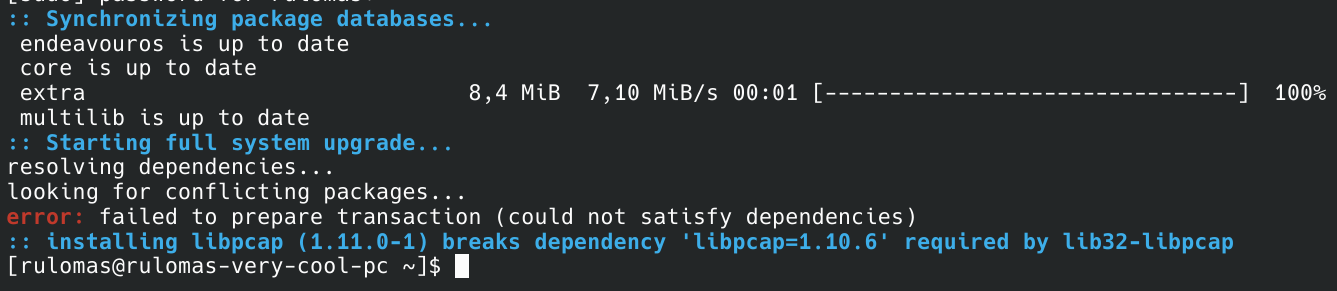
I can't update my system and I for some reason, libpcap can't be installed because it will break libpcap. It's hard to explain. Regardless, what am I supposed to do now?
r/EndeavourOS • u/Paxtian • 19d ago
Hi everyone,
Not sure what's going on and hoping to find some help. I've tried searching the Arch Wiki and elsewhere and haven't found anyone else having this issue.
About a month ago, I booted into EOS and did an update (eos-update). I'm running KDE and have a Radeon RX 7900 XT graphics card, and using Wayland.
After the update, I could get to the login screen, but after entering my credentials, the screen went blank. I was able to get to a TTY and reboot, but couldn't resolve the issue.
I tried a variety of things I could think of like downgrading Mesa drivers, but nothing helped.
Eventually, I just gave up and reinstalled EOS. While I could launch EOS from the boot drive and everything seemed to look fine there, after installation, the login screen wouldn't even load. I could again get to a TTY, but couldn't force KDE to launch. I tried using the EOS LTS kernel as well, but no dice.
Finally after messing around with that, I installed CachyOS, just to have *something* I can use. In the latest update, CachyOS encounters the exact same issue, but the CachyOS LTS kernel gets me into KDE. I haven't tried any other DEs.
Is this a known issue for the current kernel in Arch? Is it likely this will be fixed in a future update? I'm just at a loss as to where to go from here other than just wait for a new driver update. Thanks for any help!
Edit: Solved. Just needed to wait for an update. I updated today and everything is working fine, at least in CachyOS. I'll probably go back to EOS soon with the updated drivers and such, and I'll be sure to use Timeshift so this doesn't happen again.
r/EndeavourOS • u/Far_Incident2729 • 19d ago
Laser CD Ripper is a gnome app. I installed it and built it from source, but it does not see the drive I am using. Is anyone else having this problem? There is an issue open about this, and I just wanted to ask it in the distro just in case you guys had a better idea, since everyone else seems to not have any problems.
Thanks!
r/EndeavourOS • u/Gold_Cold5967 • 20d ago
I downloaded endeavour because I wanted complete customisation over my os and wanted to use my laptops specs to its full potential, endeavour is alot smoother and faster than windows but after downloading it I feel a bit lost on how to begin my customisation of it and more importantly how to learn it. I was going to use wiki as my main source but its down leaving only the forums which seem a bit all over the place with unfamiliar terms like scripting, hyprland, pacman, kernel/console/konsole/shell (i dont understand the difference) etc. i selected kde plasma as my desktop environment.
What I really need is some sort of guidance on how to go about learning my os, I have really high plans of how I want it to be customised. I want it to be mainly console based with a few files on the desktop, I want to be able to open any application or website from the console with custom commands like 'open reddit', I want the console to have some sort of built in ai chatbox (almost like jarvis from avengers) that can perform tasks nothing too heavy. I want to do so many things. So id appreciate help on how to go about this ty
r/EndeavourOS • u/Seific • 20d ago
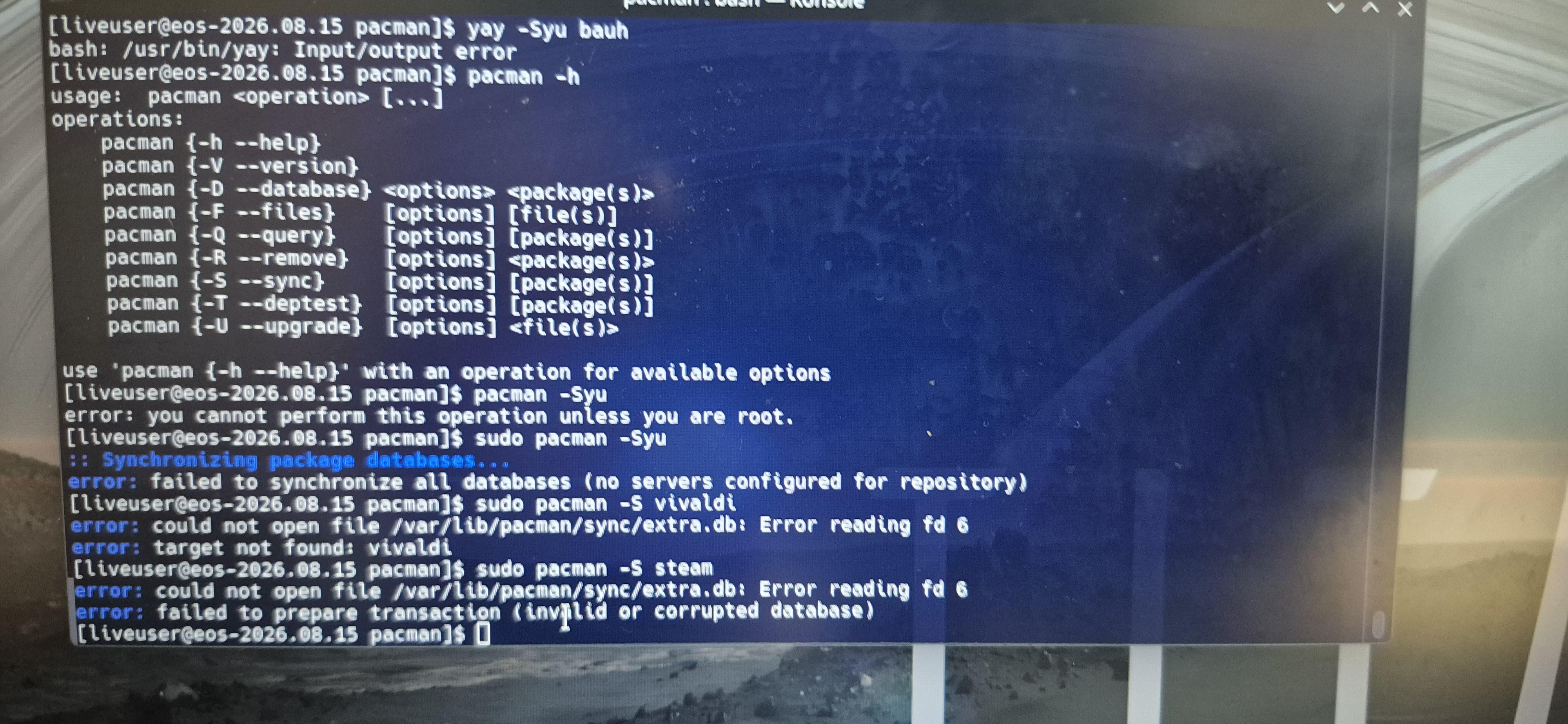
hey all, im brand new to linux and decided to start with endeavour OS. I got everything installed but now pacman does not work for installation (see attached image). I cant find anything about this online, any help would be appreciated!! (its a pic of my monitor because firefox keeps crashing and I cant install a different browser)
r/EndeavourOS • u/Able-Farm6295 • 22d ago
Hey guys 👋 I have an old Lenovo N23 Chromebook with 4GB RAM and 16GB eMMC, and I’ve been trying different Arch-based distros on it.
I tried EndeavourOS XFCE and CachyOS XFCE, and somehow EndeavourOS feels much smoother on this old Chromebook.
CachyOS XFCE doesn’t feel as smooth for me.
This kinda surprised me because both are Arch-based. 🤔
So I’m wondering, what makes EndeavourOS feel so smooth on old/low-end hardware?
Is it because of the kernel, XFCE settings, services, packages, CPU optimizations, drivers, or something else?
I thought CachyOS was supposed to be performance-focused, so I’m curious why EndeavourOS feels better on this particular hardware.
Is there some configuration or “secret sauce” in EndeavourOS that I’m missing? 😂
Would love to hear from anyone who knows about this stuff.
Thanks! 🙏
r/EndeavourOS • u/Sheeshed77 • 23d ago
So a while ago, I riced xfce on linux mint but i ended up replacing it with endeavouros. i was too lazy to bring over any ricing configs or anything so i remade the rice!

r/EndeavourOS • u/momo1098r • 23d ago
I've been using EndeavourOS on my geekom A6 for a while now, and contrary to what people usually think about rolling-release distros, with the right maintenance it's extremely stable. Kernel 7.2.4-arch1-2, KDE Plasma 6.7.5, over 1800 packages installed and zero problems... almost.
It's not "stable" in the Debian/Ubuntu LTS sense (packages frozen for years), but it's stable in the sense that it doesn't break, as long as you know what you're doing and keep everything updated with some care instead of blindly.
And then there's KDE Plasma, which I think is the most complete desktop environment out there: customizable down to the last pixel (themes, widgets, animations, layout), lightweight even on integrated hardware like this Radeon 680M, and with an interface that manages to feel modern without giving up the practicality of a "Windows-like" workflow for people coming from there. The default Breeze theme is already clean and coherent, but with a few tweaks it turns into something completely different.
The "but": with the latest update, the amdgpu firmware broke. On boot I was getting this error:
amdgpu 0000:75:00.0: [drm] *ERROR* dc_dmub_srv_log_diagnostic_data: DMCUB error - collecting diagnostic data
From what I could tell, this issue shows up specifically with monitors running above 60Hz.
I fixed it by installing an older version of the package:
boot system with flag nomodeset
Install this:
sudo pacman -U https://archive.archlinux.org/packages/l/linux-firmware-amdgpu/linux-firmware-amdgpu-20260221-1-any.pkg.tar.zst
and locking it from updating (via IgnorePkg in /etc/pacman.conf) until it gets fixed upstream.
Takeaway: rolling release is great, but being ready to downgrade when needed is part of the deal.
r/EndeavourOS • u/ftonneau • 25d ago
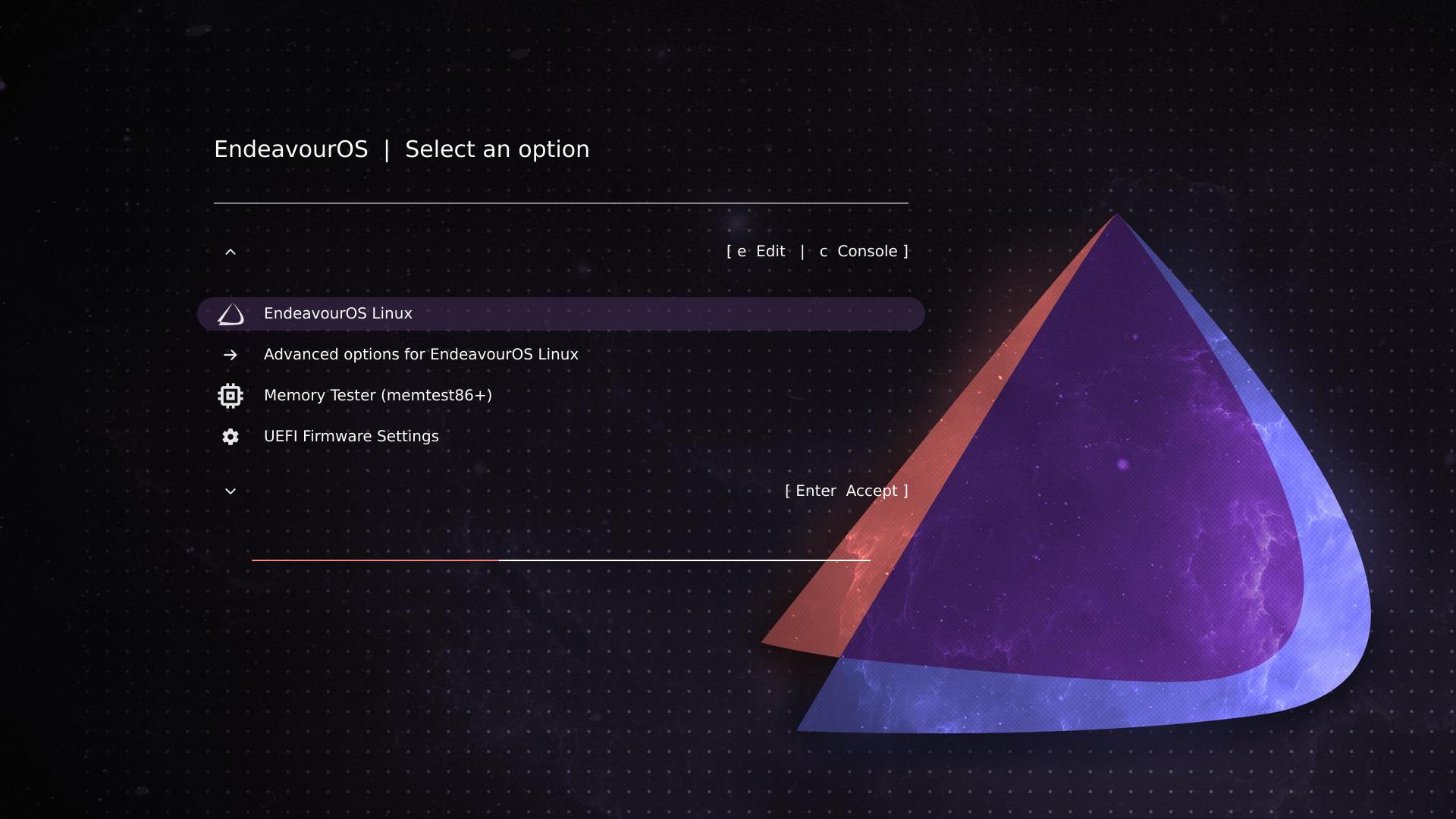
About 1 month ago, I posted here a screenshot example of my EvoDevo GRUB theme. The current post is just an update to report on important improvements: the theme (a) now has the ability to rename menu entries as you like, and (b) allows you to preview theme results without rebooting and without needing to install a VM.
Link: