r/EndeavourOS • • Jan 04 '26

Solved I really need help

Post image
16 Upvotes

Hello I am having a issue with my computer. I have installed endeavor os 3 days ago and it’s working fine now but after I Installed virtual machine I had to reboot and now I get an error and I’m stuck in the emergency reboot. “ERROR: failed to mount /efi is there any hope for me? :(

r/EndeavourOS • • 27d ago

SOLVED Should I give EndeavourOS bootloader?

Post image
37 Upvotes

Hey everyone! I am planning to dual boot arch linux and EndeavourOS soon, and just to be clear, i am using systemd-boot to boot arch linux currently, but then while checking out https://endeavouros.com/ I saw the option that said i could choose my bootloader, or I could just not install a bootloader, and add endeavourOS to an exxisting bootloader. So i was wondering, can i add arch linux AND endeavourOS to rEFInd, which i will be later installing?

r/EndeavourOS • • Aug 09 '26

SOLVED Wrong redirection via Google

Post image
27 Upvotes

Like already mentioned in a post, the website and forum where down the last days. I now discovered that google redirects to this Turkish (spam?) gambling (?) website.

Typing in the URL (https://endeavouros.com/) directly into the browser works for reaching the website, but the URL on this website seems to be correct.

As far as I see it, this only happens when being redirected via Google, since reloading the shown website leads to the "normal" EndOS website.

Can someone explain why this is happening?

r/EndeavourOS • • 18d ago

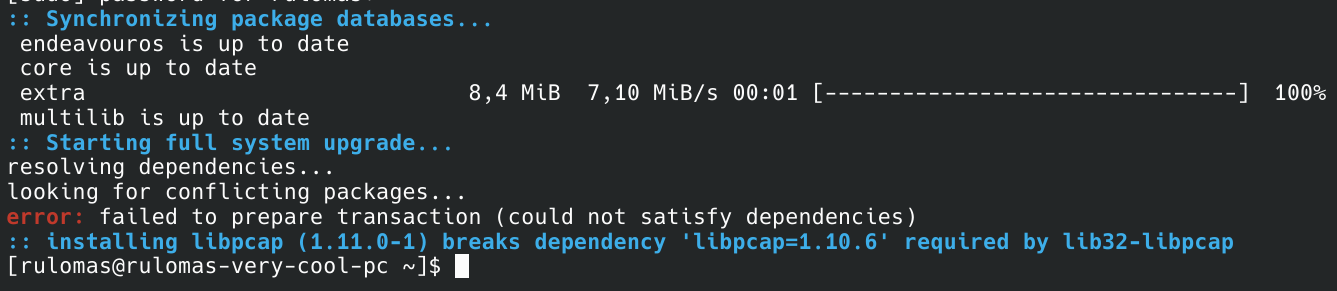
SOLVED What am I supposed to do?

Post image
27 Upvotes

I can't update my system and I for some reason, libpcap can't be installed because it will break libpcap. It's hard to explain. Regardless, what am I supposed to do now?

r/EndeavourOS • • 19d ago

SOLVED Current Drivers Not Working with Radeon RX 7900 XT in KDE

8 Upvotes

Hi everyone,

Not sure what's going on and hoping to find some help. I've tried searching the Arch Wiki and elsewhere and haven't found anyone else having this issue.

About a month ago, I booted into EOS and did an update (eos-update). I'm running KDE and have a Radeon RX 7900 XT graphics card, and using Wayland.

After the update, I could get to the login screen, but after entering my credentials, the screen went blank. I was able to get to a TTY and reboot, but couldn't resolve the issue.

I tried a variety of things I could think of like downgrading Mesa drivers, but nothing helped.

Eventually, I just gave up and reinstalled EOS. While I could launch EOS from the boot drive and everything seemed to look fine there, after installation, the login screen wouldn't even load. I could again get to a TTY, but couldn't force KDE to launch. I tried using the EOS LTS kernel as well, but no dice.

Finally after messing around with that, I installed CachyOS, just to have *something* I can use. In the latest update, CachyOS encounters the exact same issue, but the CachyOS LTS kernel gets me into KDE. I haven't tried any other DEs.

Is this a known issue for the current kernel in Arch? Is it likely this will be fixed in a future update? I'm just at a loss as to where to go from here other than just wait for a new driver update. Thanks for any help!

Edit: Solved. Just needed to wait for an update. I updated today and everything is working fine, at least in CachyOS. I'll probably go back to EOS soon with the updated drivers and such, and I'll be sure to use Timeshift so this doesn't happen again.

r/EndeavourOS • • 13d ago

SOLVED How do i change the language fully?

6 Upvotes

I am currently using Xfce4 on EndeavourOS. I have set the system language entirely to English, but there are a few places where the changes haven't taken effect. For example, on the panel clock, the numerical time displays in English, but the time-of-day indicators (morning, noon, afternoon, or night) appear in my locale's language. How do I fix the system so that it uses English exclusively?

r/EndeavourOS • • Apr 06 '26

SOLVED why cant i install librewolf using aur on this distro

10 Upvotes

i use librewolf most of the time since it just has more privacy and thats not a bad thing to have around for little cost but i havent been able to download it why is that?

and i have tried both librewolf and librewolf-bin

solution:turns out it just seems to not be found by pacman on this distro but it CAN be downloaded with
yay -S librewolf-bin

r/EndeavourOS • • 10d ago

SOLVED Altavoces (no disponibles)

1 Upvotes

I downloaded EOS yesterday and I haven't been able to listen to music due to this error, which has discouraged me a lot, but I don't want to give up. I will explain the details as best as possible in case someone can give me a hand.

​I have an Asus tuf f15 fx506lh laptop with an nvidia GTX 1650 GPU and an Intel core i5 10400h. Due to an accident I had, the 3.5 mm jack connector was damaged because my headphones' connector broke and stayed inside, so it is always detecting that headphones are connected.

​Now then, the weird part:

​When adjusting the volume with the slider, the feedback of said action is heard (I hope it's clear what this refers to), meaning the speakers output system is working. However, upon opening pavucontrol, it seems it is not receiving sound from external applications (like firefox or spot), since they do not appear in the "playback" tab; the only one that shows signs of life is Firefox, but it simply appears and then disappears immediately (in less than 0.5 s, it's literally a flash).

​I already tried modifying ALSA parameters and using hdajackretask, but neither worked.

​Can anyone give me advice on how to solve it? I hope my explanation was understandable.

r/EndeavourOS • • Aug 12 '26

SOLVED Laptop keeps looping on the boot screen and wont enter OS

2 Upvotes

Basically what says on the title, I use endeavourOS and aftee updating I usually reboot my laptop, but now after the reboot it wont boot anymore, it just keeps looping on the boot screen no matter what I do and Im panicking

I wish I could add a video, but basically, the screen turns on, the logo of the brand appears, it gets into the screen where I select "EndeavourOS (7.1.8-arch1-3)", I select it, and instead of actually booting the system the screen goes black and this repeats itself.

Can someone PLEASS help be solve this.

r/EndeavourOS • • 11d ago

SOLVED Screencapture tool behavior

3 Upvotes

I'm looking for a solution to the one thing stopping me from switching my main computer to endeavourOS. on my Ubuntu 22.04 with GNOME 42, gnome-screenshot will open with fn+prt sc, and allow the basic 3 options "window" "screen" "selection area". if i choose selection area, it allows to to sit and adjust it, much like cropping an image, and will not capture until i press enter or click the camera button.

i have not found a program that seems to allows this on endeavour; instead they all seem to allow one single attempt at "lassoing" the selection, then capture and close. I have Cinnamon desktop on that computer, and currently both cinnamon-screenshot (the extension) and gnome-screenshot are installed. i dont fully recall now, since its been a while since i went hunting for programs last, but i believe i have tried flameshot, tho i dont recall why i uninstalled it entirely.

also, the brief moment (literally less than 40 minutes) i had endeavourOS with GNOME 49, i think gnome-screenshot was also not doing what i wanted

edit: on a commentor's mention, i decided to try Flameshot again. it seems different from before, and now has the function i want. thank you!

r/EndeavourOS • • 13d ago

SOLVED Plymouth themes with an EndeavourOS touch?

1 Upvotes

Hi,

I was getting a bit bored with all that text scrolling across my screen during boot (I don't read that fast anymore), so I installed Plymouth. But there are very few, if any, EndeavourOS-themed Plymouth themes available.

How about some Plymouth themes with a proper EndeavourOS touch then?

Nothing too flashy — perhaps the EndeavourOS logo, a subtle EOS-inspired design, or something that gives you that little “yep, I’m booting EndeavourOS” feeling before the desktop appears. 😄

Has anyone already made something like this? Or maybe you have some ideas for a theme - or know where I could find one?

SOLVED:
Want a nice Plymouth theme? Do it yourself.

I simply took one of the themes from this collection: https://github.com/adi1090x/plymouth-themes, and added the EndeavourOS logo (https://endeavouros.com/media-images/) to the Plymouth script.

Processing img 6zii9nih04th1...

r/EndeavourOS • • Jul 18 '26

SOLVED Question on daily updating

3 Upvotes

Hello I am considering switching from Ubuntu to Endeavour. While installing it on a vm I noticed in the guide they mention you should not leave updates much longer than weekly updating.

What do you do if you let's say go away on holiday for a month without your computer. Is that going to be a big problem?

Thanks in advance.

r/EndeavourOS • • May 13 '26

SOLVED Why the display is like this?

Post image
40 Upvotes

Thanks y'all, that problem got fixed

Solution (Use AI to translate this): https://claude.ai/share/4fe591be-9b48-4a88-a568-22be01822b80

Hello there,
I insalled EndeavourOS today and I am facing this problem. I have this display driver problem, I don't know if the driver is not installed, updated or not loading.
can anyone help me with it?

logs link: https://paste.rs/nxvl2

I ran inxi -G
response:
Graphics Information

GPU:

- Intel HD Graphics 4600 (Haswell GT2)

- Driver: i915 (kernel driver)

Display System:

- Session Type: Wayland

- Compositor/Desktop: KWin Wayland (KDE Plasma)

- X Server: X.Org 1.21.1.21

- XWayland Version: 24.1.9

Display Resolution:

- 1024x768 @ 60Hz

Rendering Drivers:

- X11 Driver: modesetting

- DRI Driver: crocus

Graphics APIs:

- OpenGL:

Version: 4.6

Renderer: Mesa Intel HD Graphics 4600

Mesa Version: 26.0.1-arch1.1

- Vulkan:

Version: 1.4.341

Driver: intel

- EGL:

Version: 1.5

Drivers: crocus, swrast

Diagnostic Tools Installed:

- clinfo

- eglinfo

- glxinfo

- vulkaninfo

- wayland-info

- xrandr

- xdpyinfo

r/EndeavourOS • • Jul 17 '26

SOLVED welcome app popup

17 Upvotes

Anyone else getting the welcome app to pop on every reboot? Even after hitting don't show again. It still pops on the next reboot.

r/EndeavourOS • • Jul 29 '26

SOLVED A start job is running for /dev/disk/<uui> running indefinitely

5 Upvotes

For anyone still fighting with this, I just fixed it by forcing a few drivers to be available during boot, please don't @ me if your pc explodes:

arch-chroot into your system, create a /etc/dracut.conf.d/usb-boot.conf with the drivers you need, in my case:
force_drivers+=" uas usb_storage xhci_hcd xhci_pci "

Then rebuild and check if the modules are actually listed:
sudo dracut-rebuild

lsinitrd /efi/*/*/initrd | grep -E "uas|usb_storage|xhci"

Reboot

Original post:

For reference, I already posted in the EndeavourOS forums but haven't received an answer, so I thought I might also wanna try hear.

TLDR: After yesterdays pacman -Syu I get the error below. I use an external SSD that I have been using for 1+ year without problems. I can still chroot into it, and all UUIDs still look the same. I hope anyone knows what to do, so that I can boot again. 🙇

Message: A start job is running for /dev/disk/by-uuid/a7e82811-f7ea-4d44-a54e-9e2dafdd38b8 (no limit)

I already progressed a bit since my forum post, to remove the duplicate root= entries and rebuilt like this, but sadly it didn't change anything:

kernel-install add 7.1.5-arch1-2 /usr/lib/modules/7.1.5-arch1-2/vmlinuz

Other outputs:

Please let me know if any other outputs are needed.

lsblk -f

NAME   FSTYPE   FSVER            LABEL       UUID                                 FSAVAIL FSUSE% MOUNTPOINTS
loop0  squashfs 4.0                                                                              
sda                                                                                              
├─sda1 ntfs                      Data        406E7D8C6E7D7B8A                                    
└─sda2 ntfs                      Recover     28482A47482A145A                                    
sdb                                                                                              
├─sdb1 vfat     FAT32                        8892-6D69                                           
├─sdb2                                                                                           
├─sdb3 ntfs                      Boot        8CB29201B291F046                                    
├─sdb4 ntfs                                  96DC9263DC923D85                                    
└─sdb5 vfat     FAT32            PRC_RP      90EE-302C                                           
sdc                                                                                              
├─sdc1 vfat     FAT32                        BC53-DB39                                           
└─sdc2 ext4     1.0              endeavouros a7e82811-f7ea-4d44-a54e-9e2dafdd38b8  605.9G    29% /
sdd                                                                                              
├─sdd1 vfat     FAT32            NO_LABEL    3195-3F46                                           
└─sdd2 ntfs                      Sandisk     82687F1C687F0DE3                                    
sde                                                                                              
sdf    iso9660  Joliet Extension EOS_202511  2025-11-24-21-31-18-00                              
├─sdf1 iso9660  Joliet Extension EOS_202511  2025-11-24-21-31-18-00                              
└─sdf2 vfat     FAT32            ARCHISO_EFI 6924-CEA6                                           
sr0


cat /etc/fstab

# /etc/fstab: static file system information.
#
# Use 'blkid' to print the universally unique identifier for a device; this may
# be used with UUID= as a more robust way to name devices that works even if
# disks are added and removed. See fstab(5).
#
# <file system>             <mount point>  <type>  <options>  <dump>  <pass>
UUID=BC53-DB39                            /efi           vfat    fmask=0137,dmask=0027 0 2
UUID=a7e82811-f7ea-4d44-a54e-9e2dafdd38b8 /              ext4    noatime    0 1
tmpfs                                     /tmp           tmpfs   defaults,noatime,mode=1777 0 0
UUID=406E7D8C6E7D7B8A                     /mnt/data      ntfs-3g defaults,nofail,uid=1000,gid=1000,dmask=0022,fmask=113 0 0
UUID=82687F1C687F0DE3                     /mnt/sandisk   ntfs-3g defaults,nofail,uid=1000,gid=1000,dmask=0022,fmask=113 0 0

r/EndeavourOS • • Sep 01 '26

SOLVED Got this error yesterday, and today, upon boot, get 'VFS: unable to mount root fs on unknown-block(0.0)' issue, with only fallback working now

Post image
8 Upvotes

Panic report says this:

[ 5.787861] rtc_cmos rtc_cmos: registered as rtc0

[ 5.788044] rtc_cmos rtc_cmos: setting system clock to 2026-09-01T05:24:16 UTC (1788240256)

[ 5.788077] rtc_cmos rtc_cmos: alarms up to one month, y3k, 114 bytes nvram

[ 5.788445] intel_pstate: Intel P-state driver initializing

[ 5.789179] intel_pstate: HWP enabled

[ 5.789444] simple-framebuffer simple-framebuffer.0: [drm] Registered 1 planes with drm panic

[ 5.789448] [drm] Initialized simpledrm 1.0.0 for simple-framebuffer.0 on minor 0

[ 5.790237] Console: switching to colour frame buffer device 128x48

[ 5.791249] simple-framebuffer simple-framebuffer.0: [drm] fb0: simpledrmdrmfb frame buffer device

[ 5.791269] hid: raw HID events driver (C) Jiri Kosina

[ 5.791278] usbcore: registered new interface driver usbhid

[ 5.791279] usbhid: USB HID core driver

[ 5.791310] drop_monitor: Initializing network drop monitor service

[ 5.791373] NET: Registered PF_INET6 protocol family

[ 5.791529] Segment Routing with IPv6

[ 5.791530] RPL Segment Routing with IPv6

[ 5.791533] In-situ OAM (IOAM) with IPv6

[ 5.791545] NET: Registered PF_PACKET protocol family

[ 5.792215] microcode: Current revision: 0x0000003e

[ 5.792215] microcode: Updated early from: 0x0000001a

[ 5.792504] resctrl: L2 allocation detected

[ 5.792513] IPI shorthand broadcast: enabled

[ 5.793606] sched_clock: Marking stable (5786000870, 6818046)-&gt;(5830002744, -37183828)

[ 5.793791] registered taskstats version 1

[ 5.793988] Loading compiled-in X.509 certificates

[ 5.795559] Loaded X.509 cert 'Build time autogenerated kernel key: b1dabbe722d34e538910b43d5c4d897bb1583051'

[ 5.796701] zswap: loaded using pool zstd

[ 5.796725] Demotion targets for Node 0: null

[ 5.796794] Key type .fscrypt registered

[ 5.796794] Key type fscrypt-provisioning registered

[ 5.796929] Btrfs loaded, zoned=yes, fsverity=yes

[ 5.796942] Key type big_key registered

[ 5.797145] integrity: Loading X.509 certificate: UEFI:db

[ 5.797156] integrity: Loaded X.509 cert 'Microsoft Corporation UEFI CA 2011: 13adbf4309bd82709c8cd54f316ed522988a1bd4'

[ 5.797157] integrity: Loading X.509 certificate: UEFI:db

[ 5.797166] integrity: Loaded X.509 cert 'Microsoft Windows Production PCA 2011: a92902398e16c49778cd90f99e4f9ae17c55af53'

[ 5.797167] integrity: Loading X.509 certificate: UEFI:db

[ 5.797172] integrity: Loaded X.509 cert 'Microsoft Corporation: Windows UEFI CA 2023: aefc5fbbbe055d8f8daa585473499417ab5a5272'

[ 5.797173] integrity: Loading X.509 certificate: UEFI:db

[ 5.797178] integrity: Loaded X.509 cert 'Microsoft Option ROM UEFI CA 2023: 514fbf937fa46fb57bf07af8bed84b3b864b1711'

[ 5.797178] integrity: Loading X.509 certificate: UEFI:db

[ 5.797183] integrity: Loaded X.509 cert 'Microsoft UEFI CA 2023: 81aa6b3244c935bce0d6628af39827421e32497d'

[ 5.798021] PM: Magic number: 10:993:414

[ 5.798031] thermal cooling_device10: hash matches

[ 5.798127] RAS: Correctable Errors collector initialized.

[ 5.798228] clk: Disabling unused clocks

[ 5.798228] PM: genpd: Disabling unused power domains

[ 6.019861] usb 1-6: new high-speed USB device number 2 using xhci_hcd

[ 6.091572] ata3: SATA link up 6.0 Gbps (SStatus 133 SControl 300)

[ 6.091624] ata4: SATA link down (SStatus 4 SControl 300)

[ 6.091680] ata8: SATA link down (SStatus 4 SControl 300)

[ 6.091734] ata6: SATA link down (SStatus 4 SControl 300)

[ 6.091787] ata1: SATA link down (SStatus 4 SControl 300)

[ 6.091850] ata2: SATA link down (SStatus 4 SControl 300)

[ 6.091905] ata5: SATA link down (SStatus 4 SControl 300)

[ 6.091958] ata7: SATA link down (SStatus 4 SControl 300)

[ 6.092857] ata3.00: Model 'CT480BX500SSD1', rev 'M6CR052', applying quirks: nolpm

[ 6.092888] ata3.00: ATA-10: CT480BX500SSD1, M6CR052, max UDMA/133

[ 6.094010] ata3.00: 937703088 sectors, multi 1: LBA48 NCQ (depth 32), AA

[ 6.094024] ata3.00: LPM support broken, forcing max_power

[ 6.098064] ata3.00: Features: Dev-Sleep DIPM

[ 6.105926] ata3.00: configured for UDMA/133

[ 6.107034] ahci 0000:00:17.0: port does not support device sleep

[ 6.107349] scsi 2:0:0:0: Direct-Access ATA CT480BX500SSD1 052 PQ: 0 ANSI: 5

[ 6.108049] sd 2:0:0:0: [sda] 937703088 512-byte logical blocks: (480 GB/447 GiB)

[ 6.108069] sd 2:0:0:0: [sda] Write Protect is off

[ 6.108074] sd 2:0:0:0: [sda] Mode Sense: 00 3a 00 00

[ 6.108093] sd 2:0:0:0: [sda] Write cache: enabled, read cache: enabled, doesn't support DPO or FUA

[ 6.108129] sd 2:0:0:0: [sda] Preferred minimum I/O size 512 bytes

[ 6.117451] sda: sda1 sda2 sda3

[ 6.117726] sd 2:0:0:0: [sda] Attached SCSI disk

[ 6.118414] /dev/root: Can't open blockdev

[ 6.118544] VFS: Cannot open root device "UUID=997aa350-0307-4268-9841-e7a2c43f4029" or unknown-block(0,0): error -6

[ 6.118550] Please append a correct "root=" boot option; here are the available partitions:

[ 6.118556] 0800 468851544 sda

[ 6.118561] driver: sd

[ 6.118565] 0801 51200 sda1 ed293857-01

[ 6.118570]

[ 6.118572] 0802 468266808 sda2 ed293857-02

[ 6.118575]

[ 6.118576] 0803 529408 sda3 ed293857-03

[ 6.118579]

[ 6.118582] List of all bdev filesystems:

[ 6.118625] ext3

[ 6.118627] ext2

[ 6.118659] ext4

[ 6.118690] fuseblk

[ 6.118720] btrfs

[ 6.118753]

[ 6.118771] Kernel panic - not syncing: VFS: Unable to mount root fs on unknown-block(0,0)

[ 6.118782] CPU: 7 UID: 0 PID: 1 Comm: swapper/0 Not tainted 7.1.11-arch1-1 #1 PREEMPT(full) 062643d87187bbef0decfd2ab107fe2a60326ad6

[ 6.118796] Hardware name: Gigabyte Technology Co., Ltd. Z690 UD DDR4/Z690 UD DDR4, BIOS F6 01/27/2022

[ 6.118803] Call Trace:

[ 6.118810] &lt;TASK&gt;

[ 6.118816] dump_stack_lvl+0x5d/0x80

[ 6.118835] vpanic+0x20a/0x410

[ 6.118852] panic+0x6b/0x70

[ 6.118865] mount_root_generic+0x1d0/0x280

[ 6.118878] prepare_namespace+0x1cb/0x260

[ 6.118887] kernel_init_freeable+0x29a/0x2d0

[ 6.118897] ? __pfx_kernel_init+0x10/0x10

[ 6.118909] kernel_init+0x1a/0x140

[ 6.118919] ret_from_fork+0x2a7/0x330

[ 6.118928] ? __pfx_kernel_init+0x10/0x10

[ 6.118938] ret_from_fork_asm+0x1a/0x30

[ 6.118954] &lt;/TASK&gt;

[ 6.119104] Kernel Offset: 0x6e00000 from 0xffffffff81000000 (relocation range: 0xffffffff80000000-0xffffffffbfffffff)

r/EndeavourOS • • Sep 05 '26

SOLVED Printer no longer working

0 Upvotes

I have a label printer that worked fine last week that all of a sudden refuses to print. The print manager says Status: Stopped, cfFilterGhostscript: Error setting cupsCompression and I can see a quick message Ghostscript stopped with error 255 when I try to reprint.

I've tried updating, reinstalling the printer, reinstalling Endeavour, and downgrading ghostscript.

The printer still works as I can get it to work another computer running Nobara.

I can't seem to figure out what the fix is or any information that works on the Ghostscript error

EDIT: I've resolved the issue. The printer settings that determine darkness ans speed were wiped. Manually setting them again in CUPS off of defaults made it work.

r/EndeavourOS • • Jul 30 '26

SOLVED EndeavourOS External SSD Fix Guide

10 Upvotes

Both me and a friend run EndeavourOS on external SSDs (we both use the Samsung T7). After some recent update, systemd hung as it could not resolve our external drives. Burned both of us. I worked with Gemini tonight to get the issue resolved. Here is a summary of what to do if you encounter the same issue.

Here is the complete, self-contained guide you can save or share with anyone running into this exact issue on EndeavourOS / Arch Linux with systemd-boot and dracut.

How to Fix EndeavourOS Boot Hang ("A start job is running for /dev/disk/by-uuid/...")

The Problem

After a system update on EndeavourOS (or Arch-based distros using systemd-boot and dracut), the system hangs indefinitely during boot with messages like: * A start job is running for /dev/disk/by-uuid/<UUID>

Root Causes

  1. Broken Resume Hook (Swap): System updates can bake an old or invalid resume=UUID=... parameter into /etc/kernel/cmdline and Dracut's initramfs images, causing systemd to block boot while searching for a non-existent hibernation swap target.
  2. Missing Early USB/UAS Drivers (External Drives): When running Linux off an external SSD (like a Samsung T7), Dracut's default hostonly="yes" configuration omits USB host controller (xhci) and UASP (uas) drivers from the early RAM disk. The kernel loses sight of the external drive mid-boot. ## Complete Recovery Guide (Using a Live USB) ### Prerequisites
  3. A Linux Live USB (EndeavourOS, Arch Linux, or Ubuntu). If using Ubuntu, run sudo apt update then sudo apt install arch-install-scripts as this package has the arch-chroot command. ### Step 1: Boot into the Live Environment & Identify Partitions
  4. Plug in your Live USB and power on the system.
  5. Open your boot menu (F12 on Lenovo Legion laptops) and select the Live USB.
  6. Open a Terminal.
  7. Identify your target OS drive partitions using lsblk or blkid: ```bash lsblk -f

    ```

    • Example:
      • Root partition (/): /dev/sdb2
      • EFI System partition (/efi or /boot): /dev/sdb1
      • Swap partition: /dev/sdb3 ### Step 2: Mount Partitions & Chroot Mount your system files to /mnt and switch into the chroot environment: ```bash # Mount root sudo mount /dev/sdb2 /mnt

Mount EFI partition

sudo mount /dev/sdb1 /mnt/efi

Chroot into your OS

sudo arch-chroot /mnt

```

Step 3: Remove the Broken resume= Kernel Parameter

Clean up hardcoded resume parameters so Dracut stops looking for a hibernation device on boot. 1. Open /etc/kernel/cmdline: ```bash nano /etc/kernel/cmdline

2. **Delete** the entire resume=UUID=... string from the line. * **Before:** nvme_load=YES nowatchdog rw root=UUID=xxx... resume=UUID=yyy... nvidia-drm.modeset=1 * **After:** nvme_load=YES nowatchdog rw root=UUID=xxx... nvidia-drm.modeset=1 3. Save and exit (Ctrl + O, Enter, Ctrl + X). 4. Check for any drop-in overrides under /etc/cmdline.d/: bash cat /etc/cmdline.d/*.conf 2>/dev/null

``` If any file contains resume=..., edit or delete that file.

Step 4: Configure Dracut for External USB Booting & Disable Host-Only Mode

If running off an external SSD (Samsung T7, T5, or external NVMe enclosure), force Dracut to load USB drivers in early initramfs and disable host-only filtering. 1. Disable Host-Only Mode: ```bash nano /etc/dracut.conf.d/hostonly.conf

Add: text hostonly="no"

Save and exit (Ctrl + O, Enter, Ctrl + X). 2. **Force Early USB & UASP Driver Loading:** bash nano /etc/dracut.conf.d/usb-boot.conf

Add: text add_dracutmodules+=" base " force_drivers+=" uas usb_storage xhci_hcd xhci_pci nvme "

``` Save and exit (Ctrl + O, Enter, Ctrl + X).

Step 5: Regenerate Initramfs & Systemd-Boot Entries

On EndeavourOS setups with systemd-boot, use reinstall-kernels to update both the initramfs images and the loader entries in /efi/loader/entries/*.conf. ```bash reinstall-kernels

```

Step 6: Verify the Fix Before Rebooting

  1. Check Loader Entries (Confirm resume= is gone): ```bash cat /efi/loader/entries/*.conf

    ``` Ensure the options line ends cleanly without any resume=UUID=... parameter.

  2. Check Initramfs Contents (Confirm USB Drivers are Baked In): ```bash lsinitrd /efi/*/$(uname -r)/initrd 2>/dev/null | grep -E "uas|usb_storage|xhci"

    ``` You should see uas.ko.zst, xhci-pci, and rd.driver.pre=uas listed.

    Step 7: Exit and Reboot

  3. Exit the chroot: ```bash exit

    ```

  4. Unmount all mounted filesystems: ```bash sudo umount -R /mnt

    ```

  5. Reboot: ```bash reboot

    ```

  6. Remove the Live USB. Your system will now boot straight to your desktop!

r/EndeavourOS • • Jul 25 '26

SOLVED Computer shuts off and reboots at around 10%.

4 Upvotes

Computer shuts off and reboots after about 10 percent. It restarts at about the same time the log says "pacstrap: Initializing machine ID from random generator."

Things I've tried:

Multiple flash drives

Reinstalling the ISO

Resetting the BIOS

Disabling all memory overclock profiles

Disabling secure boot

r/EndeavourOS • • Sep 04 '26

SOLVED cant load kernel module binder_linux

1 Upvotes

i need to load kernel module "binder_linux" for waydroid to work but i am getting this error after i run "modprobe binder-linux devices=binder,hwbinder,vndbinder" :
modprobe: ERROR: could not insert 'binder_linux': Device or resource busy
i did everything that was said in arch wiki about waydroid, even tried setup it to be loaded at boot but it didnt work.
please help

r/EndeavourOS • • Jun 08 '26

SOLVED Steam opening and closing rapidly

8 Upvotes

Hello, everyone. I recently installed Endeavour, and now have just tried to install steam. After logging in, it seemed to load but then closed. After that, it just kept opening and closing every few dozen seconds. The windows that steam opens are just blank and close in less than a second of it opening. I made steam quit in system manager, but reopened to see if I would get the same results. It did. I reinstalled steam multiple times, and it still has this issue. If it helps, the steam loading says Loading User Data right before closing.

r/EndeavourOS • • Jul 20 '26

SOLVED Brightnessctl not working.

1 Upvotes

Working off of an ROG Zephyrus G16 (2024) RTX4090 and intel 185H CPU. I've has this issue before, but I thought I'd fixed it. Brightnessctl does detect my function key inputs and changes the brightness value when I do brightnessctl -l, but the brightness does not change at all.

GRUB_CMDLINE_LINUX=:"quiet splash i915.enable_dpcd_backlight=1 nvidia.NVreg_EnableBacklightHandler=0 nvidia.NVreg_RegistryDwords=EnableBrightnessControl=0"

This was my current fix within /etc/default/grub
But it no longer works. I'm not sure if an update messed things up or not. It does not seem to work whether I am in Integrated or Hybrid mode.

Many thanks in advance.

r/EndeavourOS • • Jul 25 '26

SOLVED Can some one explain me swaps?

2 Upvotes

I am trying to set up EOS on my laptop but I don't know which swap I should use. I looked it up on the internet but everyone was talking about zram and I couldn't find it in the installation.

r/EndeavourOS • • Aug 03 '26

SOLVED Built-in Keyboard, Trackpad, and touch screen not working on HP Envy x360 m Convertible 15m-ed0023dx.

2 Upvotes

As the title says, my trackpad, keyboard, and touchscreen are not working on my HP Envy x360 m Convertible 15m-ed0023dx. I am not sure what the issue could be. Here is the output for the command that rule 2 asked for:
https://dpaste.com/D34H5V2B4

I am not sure what other logs would be relevant. I would appreciate some help on this. The keyboard worked in the bios and systemd boot though

Edit: solved after unplugging battery for a few minutes.

r/EndeavourOS • • Mar 27 '26

SOLVED GPU fans don't turn on after boot

3 Upvotes

SOLVED: I had to enable overclocking in lact.

New/first build. I have an AMD 9070xt taichi 16g OC. When I first turn on the computer and in BIOS, the fans spin just fine, but as soon as the os loads up, they stop and I can't control them at all with coolercontrol or lact. Everything is plugged in right and the display and rgb works but not fans. I do mean never. When I play a game, it'll go until the GPU overheats and then crash, so it's not that it just hasn't gotten hot enough to need to.