r/applehelp • • 11h ago

Unsolved Bought a Macbook and Applecare instore today. Got sus emails tonight

Post image
86 Upvotes

Today, I went to the apple store to pick up an order for a Macbook. While I was there, I signed up for AppleCare One, filling in my details on the staff members device.

A few hours later, I got these two emails from a random Gmail address. It was sent to the email address that is linked to my apple account, and the second email even included my full legal name that I had typed on the employee's device.

I think "recipe" is a typo for "receipt". I didn't have a physical receipt, since it was all done by email, but I'm confused and frankly a little disturbed about how my details were so easily compromised.

Obviously I won't be replying to the emails.

I'm intending to go back to the store or call them in the morning, but does anyone have any advice or guidance?

r/applehelp • • 3h ago

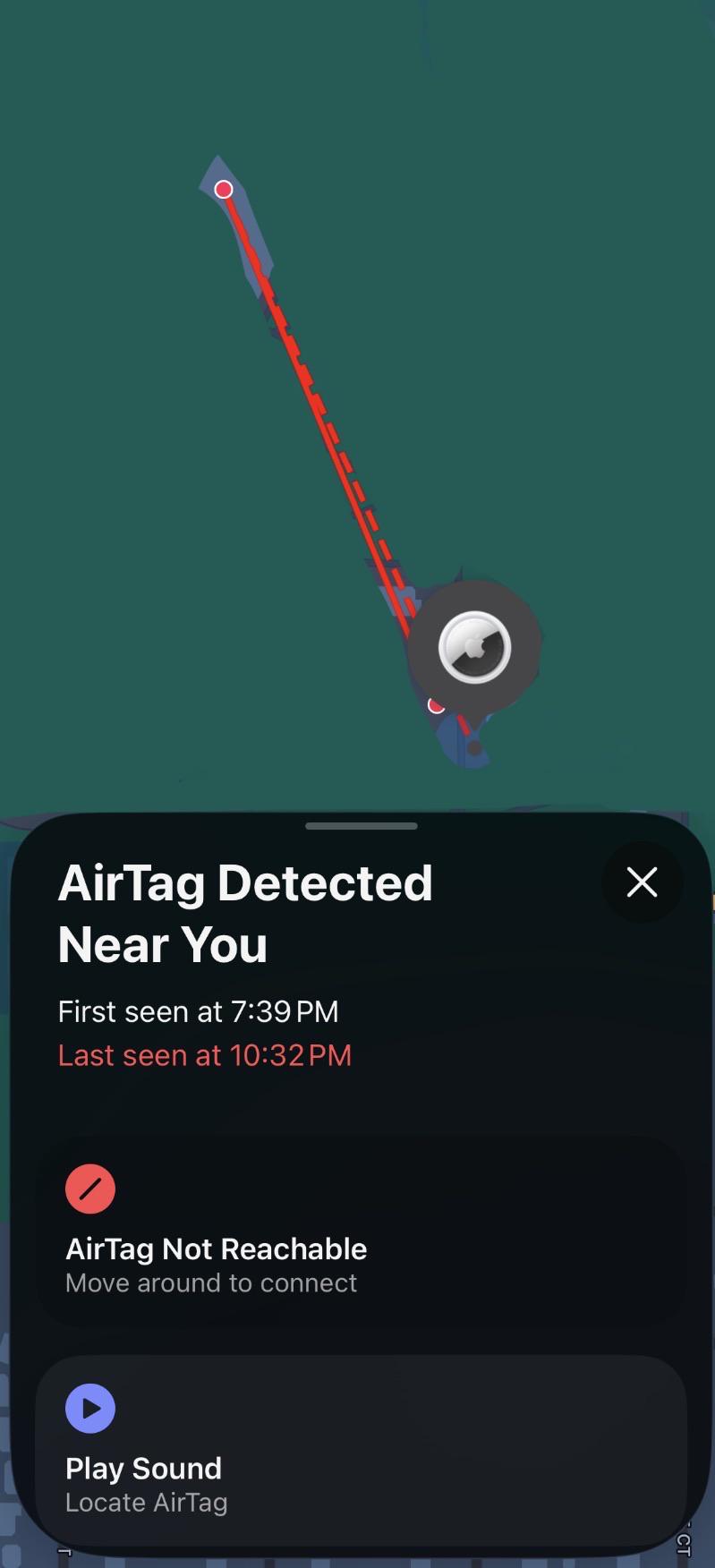
iOS I got this notification and I do not own an AirTag nor have one on me

Post image
3 Upvotes

I got this notification on my phone (iPhone 16) that lowkey freaked me out. The locations shown are my dorm and where I work (it does have a lot of people coming and going), it’s around a 9 minute walk. All I had on me between those times was my hoodie. I had nothing else on me. After I got the notification I checked my hoodie and I found nothing. As you can see I did try to play the sound and I couldn’t detect it. I went around my room to locate it. So I can say for sure that it is not in my room whatsoever. Is this just a case of someone else’s AirTag connecting to my phone by accident? I’m worried the person who owns the AirTag will now be able to track me. I have zero 0 access to this AirTag. I tried to look on the website to see if I could get any answers but I saw nothing and I don’t know if I could properly convey my issue over the phone very well. (I did check to see if it’s still detected and it’s still in the same location)


r/applehelp • • 30m ago

Unsolved hide my email forwarding densest forward emails

• Upvotes

So, I've been trying to solve this and couldn't find any solution. I need to log in to an account where I used Hide My Email, and I logged in with Apple to get a PIN sent to the email, but it doesn't get it.

I tried turning it on and off, checking my spam and all, and tried changing the email address to a Proton email, but nothing helped. When Apple sends a PIN to verify, it works, but when I try to get something sent to the email, it doesn't work, and I can't verify for apps that it's really me.


r/applehelp • • 33m ago

iOS New iPhone 15 - iOS glitch?

• Upvotes

Hi gang, I bought a refurbed iPhone 15 yesterday as my old iPhone SE which I had for 5 years which was just dead. I got the phone yesterday and it has crashed a couple of times since set up. I just feel like it's so unlikely that I would receive a faulty device as I've had a lot of Apple products over the years and this has never happened nor has happened to anyone I know. Has anyone else experienced this problem with the new iOS update as I am SUSing that this is just potential glitches rather than receiving iPhone or at least I hope so but I have 2 weeks to send it back. Just would appreciate some help or advice

Its happened about 4 times, the app will just go dead then the screen will go black. Sometimes it feels a lil hot then resets. Not happening with any specific app etc.


r/applehelp • • 8h ago

Unsolved Experiences with how long it takes for Apple to repair/replace your product when sent to depot for repair?

Post image
4 Upvotes

Left my Airpods Max at the apple store to send to the depot on the 8th of October and they said estimated date to pick them up would be 15th of October (today is the 14th). They received it on the 12th, and now is sitting on 'Diagnosis in progress'.

I know two days isn't too bad, but I've read of other experiences who have said they've gotten theirs back within a few days, and others saying they've had theirs stuck with 'diagnosis in progress' for two weeks. Also the find my location on my airpods havent had any updates since yesterday.

I'm not in a big rush to get them back but it would be nice! Also to know if they'd get repaired or replaced. They said at the apple store that if they couldnt fix the problem theyd replace it. it had a few issues (there'd be a crackling/wind noise only in the right ear during noice cancelling/transparency that would only happen after wearing for maybe 3-5 minutes, so not noticeable at first and gradually gets louder, and would buzz when plugged into the charger or hovering near the charging port) so also worried they might not get the issue if they only test it out for a minute or so.

For anybody who's sent Apple something to repair how long did it take?


r/applehelp • • 1h ago

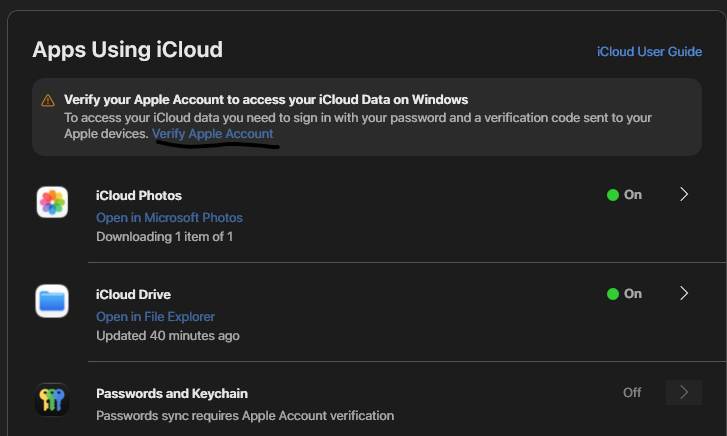
Unsolved iCloud Windows Can't Verify

Post image
• Upvotes

I'm trying to get password manager on my windows laptop, but everytime I try and do this step I run into the same loop:
1. iCloud hasn't intialized, please try again in a bit followed by entering my password
2. Auth failed, retrying
3. Window closes

I've uninstalled and reinstalled, deleted certificates and whatnot, still can't get it to work.


r/applehelp • • 1h ago

iOS iPhone 11 failed computer recovery now it won’t turn in

Thumbnail gallery
• Upvotes

r/applehelp • • 5h ago

Mac Hey, I bought my MacBook Pro just 3 months ago, but it’s heating up and the battery is draining very quickly. It drops from 80% to 20% in just 3–4 hours. What could be the problem?

Post image
2 Upvotes

r/applehelp • • 1h ago

Unsolved Can I get a iphone 18 pro for free

• Upvotes

Is anybody give me a iphone 18 pro for free ?


r/applehelp • • 6h ago

Unsolved Account.apple.com stuck on loading screen

2 Upvotes

I am trying to manage my account but it just keeps on loading. I tried using different devices, phone, desktop, laptop but no luck. Can someone help me please?


r/applehelp • • 12h ago

Unsolved Apple account locked and support won’t give me a specific reason beyond “suspected fraud.”

8 Upvotes

In an attempt to update a frequently used app today, I unexpectedly received an error message that read ”Your account has been disabled in the app store and iTunes.“ I wasn't sure what this meant, so I attempted to download a random app and received a message that read “Your media and purchases accounted as been disabled.” I clicked on my profile through the app store and was promoted to log in. “You cannot log in because your account has been locked” with a link to contact support. The Ai agent over the phone said that once my account has been locked, Apple has made their final decision and I cannot recover the account or appeal the process and will lose access to everything, photos, purchases, etc. associated with my apple account.

I finally got on the phone with a real person who couldn’t give me an answer beyond ”The team that locked your account only put “fraudulent activity” in the notes and didn’t explain further how they came to that conclusion.“ This agent went through my purchase history and asked me to confirm or deny anything. I was able to confirm all 4 purchases because, that’s right, I’ve only made 4 purchases through apple since owning my first iPhone 5 years ago. She herself stated nothing she saw indicated fraud and I reiterated that there haven’t even been purchases I didn’t make showing up on my bank statements.

She mentioned it could be from requesting refunds. What refunds? For the many purchases I haven’t made?? She reiterated that, if they won’t reactivate my account, then yes I lose anything associated with it. Including purchases I have made. So now I wont have access to apps I bought with my own money because someone random flagged my account for fraudulent activity with no apparent basis for their decision. I am beyond frustrated and was told to call back in 24 hours.


r/applehelp • • 2h ago

Unsolved Own an iPad, but not an iPhone, how do I set up the iPad to send messages from it's esim number?

1 Upvotes

Hi, I have an iPad mini with a new sim. I'm trying to change the settings to send messages on it from the sim phone number, but I don't have an iPhone. Is there any way to do this without an iPhone? It's my only way to stay connected with family who only use Apple products.


r/applehelp • • 8h ago

Unsolved Can I remove a profile from my MacBook without knowing the person’s Apple ID password?

3 Upvotes

I’ve just discovered that my ex-partner set himself up on my MacBook when we were together. We are no contact now, and he will not be co-operative about helping me with this situation and I want to get him off my MacBook as he can use Find My to see where I am.

To remove his profile it’s asking me for his Apple ID password which I don’t know of course. What can I do to remove his profile and stop him from being able to use Find My to see its location?

TIA


r/applehelp • • 6h ago

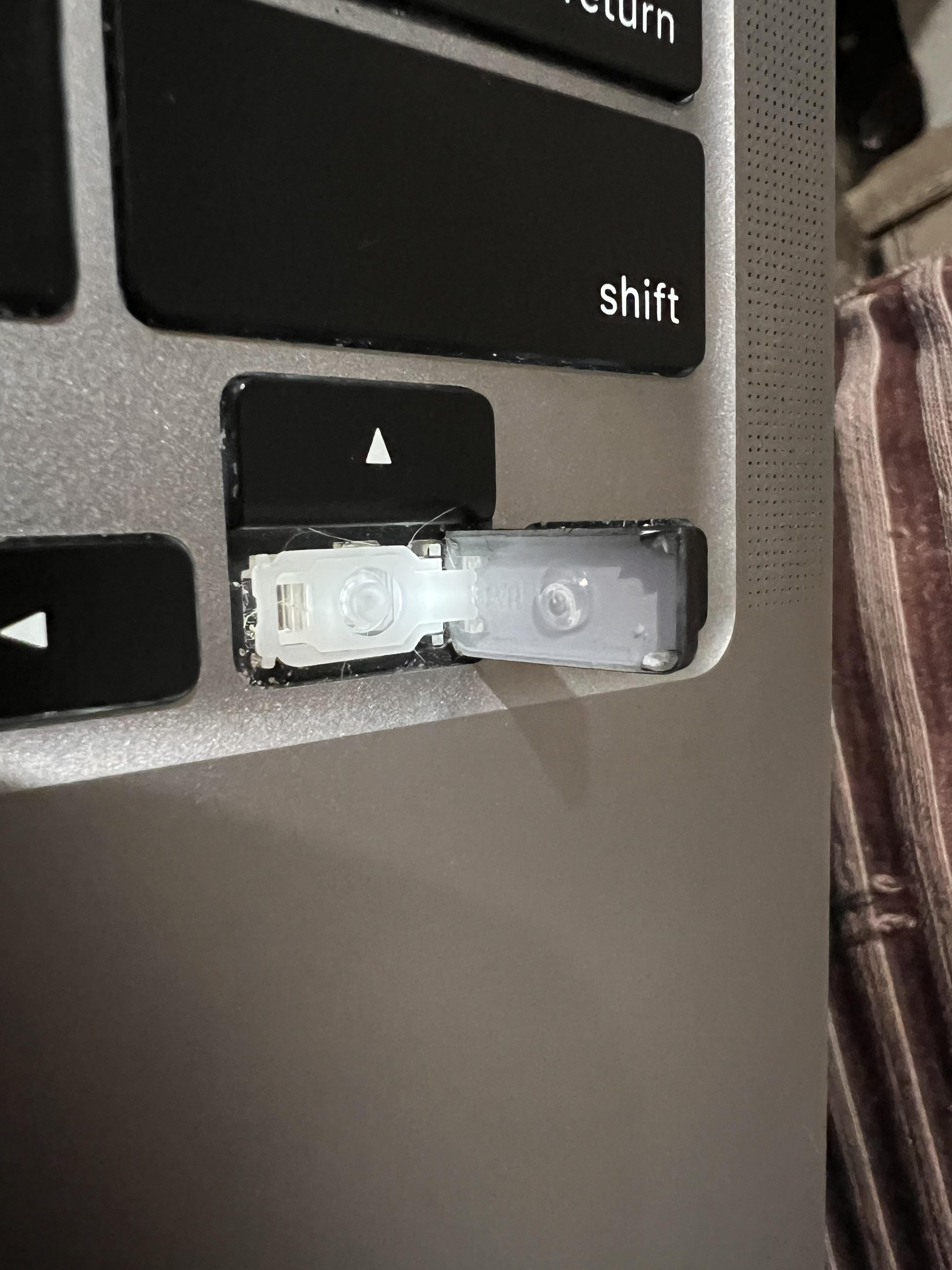
Mac My Arrow key opened like this!

Post image
2 Upvotes

r/applehelp • • 6h ago

iOS Unable to change my Apple Account country/region despite trying everything. Apple Support couldn’t resolve it either.

2 Upvotes

I’m trying to change my Apple Account country/region, but I’m stuck and can’t seem to find a solution.
I’ve checked the usual restrictions, including my subscriptions. One subscription is still active until December 16, while another is already inactive. I’ve tried all the suggested troubleshooting steps, but the region change option is still blocked.
I’ve also contacted Apple Support, but they couldn’t resolve the issue either.
I’m trying to change my region so I can use the App Store in my current country, and this has become incredibly frustrating.
Has anyone experienced something similar and actually found a solution? Is there any way to get this fixed without going in circles with Apple Support?


r/applehelp • • 6h ago

iOS my photos storage dropped ~50 gigabytes?

2 Upvotes

basically the title. i’ve been fighting with my photos storage for a while, i have ~1200 photos and didnt want to delete them, so i’ve been offloading and reinstalling larger apps like instagram and spotify as i needed them. i just got off work and checked my phone to reinstall spotify and my photos storage dropped to 7gb? nothing is deleted but i don’t purposely save anything to the cloud so idk what happened!!


r/applehelp • • 3h ago

Mac 為什麼你們連線都沒有了😡?這讓人家怎麼充電?喵?😭

Post image
0 Upvotes

r/applehelp • • 3h ago

Mac Mac m2 air slows down with memory issues with Claude code and chrome opened

1 Upvotes

Hi guys, I am working on my startup with mac m2 air solo. I mostly have Claude code and chrome opened but it starts hitting memory issues very fast and mac slows down. Eventually I have to close and restart them.
Is there any memory tracker which can help me keep these in check etc?


r/applehelp • • 8h ago

iOS I have several iOS devices that use family sharing and family members are able to locate me on Find My and erase my devices. How can I prevent this?

2 Upvotes

I have several iOS devices that use family sharing and family members are able to locate me on Find My and erase my devices. How can I prevent this?


r/applehelp • • 4h ago

Unsolved How Do I Remove This ?

Post image
0 Upvotes

r/applehelp • • 5h ago

Unsolved Apple TV Remote has a mind of its own?!

1 Upvotes

My 1st Gen Apple TV Siri Remote (the one with a Lightning port) seems to be fighting with my soundbar.

Anytime I point the remote in its direction, it automatically turns the volume right down as if it has sticky keys or something. Anytime I attempt to turn it back up, it’ll continually force itself back down.

It isn’t a soundbar issue, as my soundbar remote works fine, and I’ve just upgraded the soundbar and the remote it doing the same thing.

I'm assuming it’s an IR issue? I’ve done all the steps I’ve seen online for resetting, reconnecting, repairing, charging the remote etc., to no avail.

Has anyone else experienced this? Would love to see if there are any other tricks to try before I commit $100 (NZD) to a new remote.


r/applehelp • • 8h ago

Unsolved Ipad battery wont charge!

2 Upvotes

As the title says my Ipads battery— despite the charge indicator saying its charging— will not increase. its been stuck at 46% for a few hours now, occasionally it goes to 47% but not for long. The charger works for all my other apple devices, and ive tried pluggung it into multiple chargers but i still get the same results. if helpful, my ipads maxium charge capacity is 89% and ive had it for two years. thank you in advance! (edit: the port has been cleaned and the issue still occurs, ive also tried restarting my ipad but to no avail.)


r/applehelp • • 6h ago

Unsolved recover old ipad password

Thumbnail
1 Upvotes

r/applehelp • • 6h ago

Mac Trying to get jumbo frames on 25GbE

1 Upvotes

I'm trying to get "beyond 10GbE" in a system with two computers, a switch, and a NAS. The NAS has a 25GbE card (made by the NAS vendor), the switch has six 25GbE ports (and twelve 10GbE) from the same NAS vendor, and we got a couple TB 25GbE NICs which run REALLY HOT.

However, these NICs have an NVIDIA-compatible chip inside which invokes the MLX driver in MacOS, but this driver only supports up to 2034B/pkt (and not the typical jumbo packet size of ~9000). We don't need it to go all the way to 9000, but we don't want to leave any money/performance on the table. The NAS will get 1-2 2TB SSDs for read (or r/w) caching, so we might be able to choke the network sometimes.

We have also tried an expansion chassis, but the first card we tried was also MLX -compat and triggered the same driver. (We're learning things in stages.) We just finished trying an Intel 810 card because Gemini said these Intel NICs WOULD support jumbo frames up to 9000B, but alas, there doesn't appear to be a driver in MacOS. (Gemini said the same thing about BCM cards, but we might abandon ship before getting one since the Internet says there are ALSO no drivers for them on Macs.)

The question is: are there available drivers for Intel- or BCM-compatible 25GbE PCIe cards (or even "better" drivers for NVIDIA-compat NICs)? I don't want to shell out four figures for the ATTO/Sonnet solutions when these other cards are US$75-150.

PS: A lot of the history of our trek is documented in r/HomeNetworking under my username.


r/applehelp • • 6h ago

Solved Trying to mail myself images from an old iPad but was given an strange warning.

Post image
0 Upvotes

it’s been awhile since I’ve went through this old iPad of mine, so it might have all kinds of problems.

It’s an iPad 2nd generation model MC769LL/A, version 9.3.5 (13G36).

I wanted to retrieve old images and recordings on the device by mailing them to my email, but I was met with this warning. The same warning popped up when I tried deleting an app.

I don’t really know what this means. I’ve tried searching about it, and I’m afraid there’s some kind of hidden malware that I’m not aware of. Would anybody have an idea?

(Also I meant to say “A” instead of “An” sorry for the typo)