Gnome Disks says that drive has 367 bad sectors, not sure if it is the USB adapter I use or it was like that, might try it internally with the SATA cables to see if it makes a difference.
Anyway, not sure if I'm just wasting time here, should I just trash the drive? It was my ancient OS, seems it has run time of over 4 years, currently used as a backup drive (same backup as other files, so even if this fails, I still have others) idk, never trashed a storage before, feels... Wrong? Never lost data as well, so kinda lost on the procedure.
Maybe it should be used as an "USB Stick"? Or the unreliability is just that bad?
If gnome disks says it has 367 bad sectors, is this SMART? If so, I'd guess those bad sectors are already replaced internally by the drive and your drive just gives a logical single drive.
So there is nothing you need to fix manually on the software layer with badblocks.
It does say it is SMART, also says it is relocated, but SMART also points my main drive to be running at 98 degrees CELSIUS, which well, is kinda impossible because it would be melting or at least be hot on touch.
badblocks line returned 0 errors so I guess Gnome Disks isn't accurate on my DE based on those two examples? I will eventually try the drive internally without an USB adapter to see if something changes.
but SMART also points my main drive to be running at 98 degrees CELSIUS
This is probably 98% on the scale of 0%-100% of acceptable degrees celsius.
There is also a raw value showing the actual degrees.
For the rest of the 0 errors, I just quote u/dasunt:
Any hard drive you have today will have spare blocks. When the drive itself detects a block that is going bad, it remaps that block to one of the spare blocks and records the bad block in the SMART data.
So bad blocks is seeing the good remapped block and not finding an issue.
Where Gnome Disk is checking the SMART data and seeing that the disk itself found a bad block.
You might be able to fix it via software, idk the process or how to do it, but you can.
If you run the tool and still have badblocks then it is a hardware problem. Probably it still works, I think the only penalty is that in some regions the read speed might drop.
Is up to you if you still wanna use it or throw at the trash...
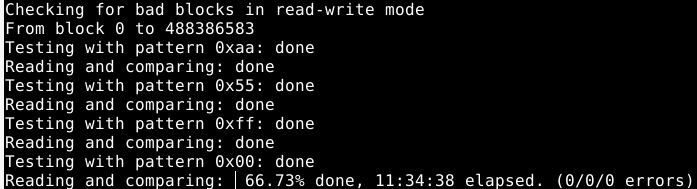
sudo badblocks -s -v -w /dev/sdb
Checking for bad blocks in read-write mode
From block 0 to 488386583
Testing with pattern 0xaa: done
Reading and comparing: done
Testing with pattern 0x55: done
Reading and comparing: done
Testing with pattern 0xff: done
Reading and comparing: done
Testing with pattern 0x00: done
Reading and comparing: done
Pass completed, 0 bad blocks found. (0/0/0 errors)
0 Errors with badblocks, I will trust a 14 hours terminal check compared to that Disks utility which didn't even came with my DE.
smartctl shows "194 Temperature_Celsius 026 047 26 (Min/Max 17/47)", but disks shows (98° C / 208° F) in that same drive (not the one with bad blocks but the one I'm using for the OS)
So yeah, I should probably dump Gnome Disks instead, I just love how it looks and... Works?
I'll try what I said about having it internally, not sure when, kinda busy and I came back pretty late to be with lights on making a bit of noise.
Badblocks basically makes a list of known bad sectors that can be flagged not to be used.
Realistically, any modern-ish drive that's showing badblocks is probably doomed. Use what time you have left to get a backup of anything you care about.
Copy paste from other reply, so... It basically showed no bad blocks despite testing it for over 14 hours, so it is probably a mistake from the Gnome Disk program.
Bad blocks is checking the drive blocks it can access. All of those blocks are fine.
Any hard drive you have today will have spare blocks. When the drive itself detects a block that is going bad, it remaps that block to one of the spare blocks and records the bad block in the SMART data.
So bad blocks is seeing the good remapped block and not finding an issue.
Where Gnome Disk is checking the SMART data and seeing that the disk itself found a bad block.
Badblocks was used to help on hdd disks with physical platters. On ssds its basically not fixing anything and soon the entire ssd will go bad losing everything so just replace an ssd disk. I mean you can make an argument its a test tool now but its really a legacy tool used when hardware worked differently. Remember that long ago we didnt even have smart on hard disks.
I mean it will still have smart and remap blocks itself if its only 8 or 10 years old. Smart came out in like 2004 or around then. Not sure how big this disk is but is it worth the effort?
Not really worth it, it is just 500GB, I like that space, makes space awareness better and fits my backup methods, but finding 500GB seems to be harder nowadays, the norm seems to be over 1TB, even finding regular HDD seems to be messed up, at least on Amazon, I remember not finding HDD on locals around 3 years ago.
I have a weird backup method, more space would just make it more annoying to the point I would just skip it.
I did saw a couple of external ones which comes already with a case and the cables, might get those if I can't find regular ones

7
u/ween3and20characterz 17h ago
If gnome disks says it has 367 bad sectors, is this SMART? If so, I'd guess those bad sectors are already replaced internally by the drive and your drive just gives a logical single drive.
So there is nothing you need to fix manually on the software layer with badblocks.