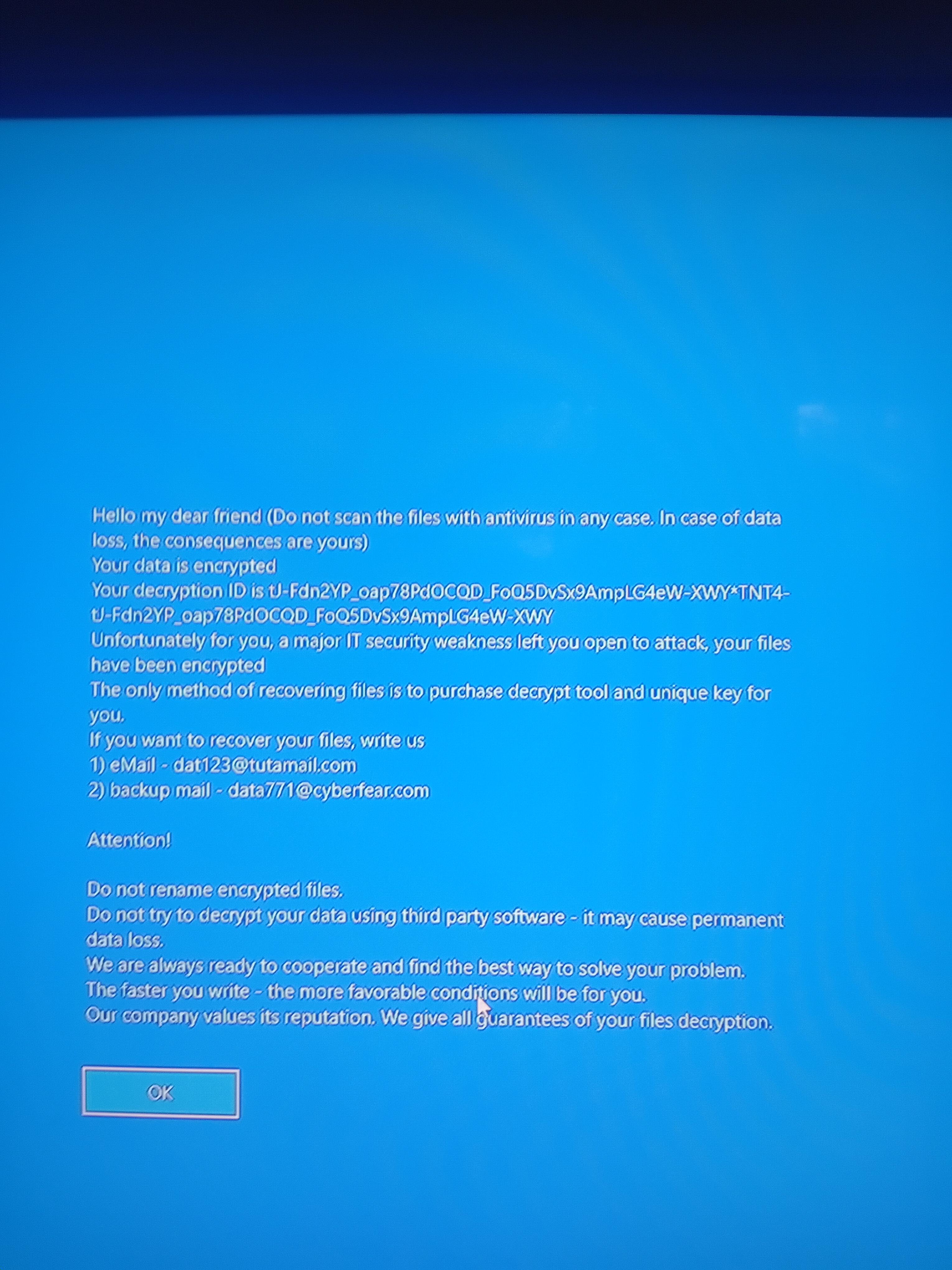
I left my computer on terraria overnight, and when I turned on my screen this afternoon, I had been logged out. When I clicked to login this popped up! Is it real, is it a fake scam, am I doomed or is there a way around it? I don't want to do anything until I know exactly what it is. Please help me!
EDIT: If it helps, I had a port forwarding rule for this machine. I did just delete it after I saw this.
EDIT 2: I really cannot lose any data on this machine, I have very important files and family things on this computer and its 3 drives. I cannot clean install.
EDIT 3: I did not have backups (very stupid I know) but I am not the richest and do not have much money for lots of drives or one massive drive or even a cloud server for any kind of backup.
EDIT 4: My 'drive in use' light is always on now, it never was before and used to function normally. Hopefully this helps.
EDIT 5: I logged in and its all encrypted for real. Every file over 10mb has this string of text in its file extension: TNT4-tJ-Fdn2YP_oap78PdOCQD_FoQ5DvSx9AmpLG4eW- I tried renaming an unimportant file and its headers are scrambled. When opened it cannot be read. I found out why my 'drive in use' light is always on, these fuckers have some kind of software running in the backround making my drives constantly used and cooking them slowly overtime. My taskmanager is disabled so I can't even open that.
EDIT 6: Ive tried linux now, and it cant mount the drives. It says they are in an unsafe state and are unclean.
Unfortunately, there is no way to decrypt your files yourself, so they are likely lost. Do not pay the ransom. Most people who pay never get their files back, or the hackers just ask for more money.
The safest move is to format your drive and do a clean Windows installation.
Also, ransomware often comes bundled with tools that steal passwords. You should immediately change all your sensitive passwords using a different, clean device like your phone.
It would be interesting to know how you got infected. Be careful with unofficial game mods or servers.
No decryptor is provided, but a traditional data recovery service may be able to help put together shadow copies, temporary files, and old deleted versions in unallocated space.
I assume - as all scammers do - they will just try getting more and more money without giving them any way to decrypt the files
From what I see from other posts, there may not be any way to get the files back sadly
I've had the pleasure of seeing this first hand, the business paid and did receive a functioning tool. Otherwise nobody would ever pay if attackers never held up their side.
Cyber insurance deals with everything, including talking with the attacker.
Although that was a multi hundred thousand dollar ransom against a business dealing with a known group. No idea how you'll fare here.
But should still probably just take the L and reformat.
Nah, that “lol” was completely unnecessary. OP had something monumentally shitty happen to them. Try having some empathy instead of laughing at them while they’re down.
"Minor inconvenience" when you lose literally all of the data on the computer.
Not everything gets backed up to the cloud, and some things are INTENTIONALLY not backed up to the cloud. Some of these also install as rootkits, meaning even wiping and reinstalling won't work.
For someone who hasn't done it before, too, reinstalling Windows can seem like a massive, daunting task, and then you have to go through all the trouble of reinstalling all of your programs, redoing all of your settings..... If you can swing the money, it can sometimes be easier to just get a whole new computer entirely.
Backups OP! I trea the internet and all devcies i use as temporary and such and i wont put my life on my devices without things such as backup and data protection.
You keep saying these files are important and you need them but the pill you need to swallow right now is that, if these files are actually encrypted, they're gone for good if you didn't make any backups.
You could sit on the encrypted files in the hopes a universal decryptor is made for this specific encryption but unless and until that happens there's nothing you can really do but reformat.
For example if you got a word doc and you copy it using ubuntu you should be able to open it and it will open fine.
If the text is garbled then they actually encrypted the files.
Remember, scammers lie. I've been put in situations where customers get told a lie that their files are encrypted when in reality they just want money.
You can use Ubuntu like he said, or try Kali Linux Live and mount your ntfs. Kali has a lot of penetration testing tools, and some can even remove windows password effortlessly (tool: chntpw), if not encrypted. Mount it and check whether the files are encrypted or not.
Sysdestroy is unlikely because that defeats the purpose of ransomware. If they had a script that bricked the pc when somone panicked and tried restarting they wouldnt get their money. VER_TU is profit based they want money from their victems not a bricked system
Nope. I never have and never will. I have always been dead scared of computer viruses, so I have never even seen a glimpse of the sketchy side of the internet.
No. I literally have not ever been on a schetchy website for more than a glimpse before realising and closing the browser. And how doez me getting virus mean Ive been on sketchy websites? Hackers can exploit any security flaw to put viruses in your system. Im just trying to find a solution. Please stop.
They ask because most of the time on here people say "i didnt even do anything." And later in a comments they say "all i did was install a file someone on discord sent me to try their game"
Check to see if the files are actually encrypted with Linux. If the aren't back them up. If they are, say good bye to your files and wipe your drives. Most of the time when people say the files are important they really aren't because if they were you'd have paper copies and wouldve backed them up on a flash drive or the cloud.
Had one of these pop up on me years ago; pretty sure it came from a game pirating site I downloaded from. After fully realizing what happened, said "Bet it was that damn game", made a Slax Linux distro on a USB drive through another computer, booted into it, dragged all my important files onto the USB, and then system wiped.
As soon as I rebooted. I installed the game earlier that week, and I usually leave my PC on sleep mode, but remember fully restarting it (4 or 5 days had passed) and then being immediately met with one of these afterwards.
You can login.
However, if the files are actually encrypted, you won't be able to access them without the encryption key/tool.
The linux live pen, is very good advice, there may be a chance that the files are actually not encrypted, most people aren't tech savy, and wouldn't know the difference, and many times, that's what hackers rely on, that people don't know, and will panic, and comply with whatever they're told.
So remain calm, try the linux live pen, it doesn't necessarily need to be ubuntu, it could be another distro you may be more familiar with.
If the files are encrypted, there are IT services, and some specialized in data recovery, that may have detection tool or mechanism to recognize the software or type of encryption used, and maybe even have safe decryption tools, that will charge you a service fee, and take care of it for you.
You last resort, is to actually talk to the hackers and hope they are "reasonable" in how much they ask you, and that you can actually afford it since you say you can't lose that data.
If nothing I mentioned is viable, you may also try having some of the encrypted files analyzed by some AI, and see any suggestions.
And then, if none of the above works, you may just have to accept thay that data is lost, and learn a tough but valuable life lesson.
Your PC has most likely been infected by VoidCrypt ransomware.
Unfortunately, there is no way to decrypt your files yourself, so they are likely lost. Do not pay the ransom. Most people who pay never get their files back, or the hackers just ask for more money.
The safest move is to format your drive and do a clean Windows installation.
Also, ransomware often comes bundled with tools that steal passwords. You should immediately change all your sensitive passwords using a different, clean device like your phone.
It would be interesting to know how you got infected. Be careful with unofficial game mods or servers.
Game mods and custom servers can execute malicious code on your computer. This can silently download an .exe file or use other methods, but either way, your security can be compromised.
Have you downloaded any standalone mods for terraria or any newish modpacks? If so then theres potential that could be one of the causes of this. There has been quite alot of mods being injected with malware for alot of games not just terarria and mc.
I had a bunch of very important files on this machine. I really need them recovered. Have you seen this exact screen before? I know that this part is just a custom login message. I can log in but do not want to on fear of causing more damage.
You need to seriously evaluate what is "very important". Are game installations and save files truly important? Probably not. Documents such as banking statements or personal projects? Likely, though bank statements may be sitting in your email as well. Sit down and ask yourself, "what data would be seriously detrimental for me to completely lose?" and back those things up - possibly in more than one location.
You don't need to store all that. Just the actual important stuff. Like legal and financial documents. If these "important files" aren't those then realistically they aren't really important.
In the future, invest in an external hdd device and store your important files on that. That way your files will never be at risk. As long as its unplugged and away during a malware attack it should be safe. Unless its program files and such. It might still be worth investing in one depending on those programs though. I hope things work out and you manage to obtain your important files without needing to wipe them. Godspeed o7
That is weird, since I have a custom logon screen using ClassicLogonShell2, and that is a noemal program installed to the "program files x86" folder, and that loaded fine with no issues. And it is just a simple executable that taps into the logon ui. So maybe not...
It doesnt replace it. It goes over it. It stores nothing. It sends nothing. It just inputs the text into the ui boxes when you type your password. It does not do anything to the logon ui itself. Google ai is wrong
All I can suggest then is to disconnect your computer from the internet immediately. After that, you can try to access your drive using a Linux Live USB to see what is left, but since the PC was left on overnight, the hackers unfortunately had all the time they needed to encrypt everything.
I haven't personally encountered this exact screen, but the reason it is most likely VoidCrypt is that the decryption ID follows a specific pattern with asterisks and repeated text strings. The exact message or screen design changes depending on the specific variant or version of the ransomware.
No decryptor is provided, but a traditional data recovery service may be able to help put together shadow copies, temporary files, and old deleted versions in unallocated space.
I saw someone mention trying to access the files from Linux, do that and if it turns out they actually are encrypted then I recommend checking out this resource and seeing if they have a publicly known decryption key.
https://www.nomoreransom.org/
I know you are probably desperate and I can completely understand that but please do not pay the ransom, you are never guaranteed to get a working key (or even one at all) and it will only worsen your suffering.
The best thing you could probably do right now is backup your files even if they are all encrypted and hope that one day eventually a decryptor will be made for this specific ransomware, which will allow you to recover them. You'll need to boot into a Linux environment to do so.
EDIT: This looks like Mimic/Pay2Key or a variant of it and sadly no decryptor exists for these.
You have only a few things you can do. Find out if it's a real encrypted ransomware or just redo it. Yes "I have important files I need and can't" you have said a lot. You may not have a choice. Don't pay the money, ctrl+alt+del, alt+f4... Do something... Just sitting there staring at the screen won't do anything. If it's encrypted, you are up a river. I have lost important files before, learned to backup after that. Next time try that. I'm sorry this happened.
If you get in your computer, run malware software after you figure out they aren't encrypted.
Yeah the customshell thing. Thats what destroyed your login you quite literally handed the keys to your computer because you likely got tricked and downloaded it from the incorrect site or downloaded from a compromised version of the site. Good news is its unlikely to be encrypted because that would mean its a shell replacement. Evidence being you have your mouse. Low level ransomware dont give you your mouse likely an unclosable app or browser tab.
the bad news? your files are gone.... that is, until a decryptor gets made avallible. but that can take years, AND can't guarantee all your files are kept. Depending on how the ransomware works, it might also wipe files after a certian amount of time.
FULLY wipe windows and change account passwords for any service you used on that PC (just in case). the alternative is keeping your PC like this forever, in the hopes some random guy will release a decryptor for this specific ransomware for free.
Hate to break it to you, but those files are gone forever. Next time please don't download some scummy ahh looking exe files. If you do, make sure to test them at tria.ge, using a sand box environment and judge it's behaviour.
Files aren't recoverable as we don't know what encryption pattern did they use, as there are millions of possible encryptions.
Try, as others have suggested, to access the files on the drive from a Linux live boot. If the files are encrypted, they'll be garbage data. There's a chance this could be fake ransomware that's just giving the impression of encryption and you can save your files, reinstall windows and you'll be fine. Leaving ports open, logging onto custom servers, installing mod software, not keeping security updates current, not double-checking where your files are coming from are the most common causes of infection. In the future, act with extreme caution. Trust nothing without research. Also, never accept notifications from any website. They trick people into downloading malware every day, it's just good advice to follow.
Request help with FRST and SecurityCheck from the trusted helper team
Please visit Providing or receiving help with FRST on the subreddit and share your 3 keywords returned from the website along with the details about your infection.
Once a malware removal expert or trainee sees it, they will reply in the thread about further steps. If you suspect an infostealer infection, please change all your passwords from a clean device immediately and do not use any of your accounts from the infected device.
If you need urgent help and cannot wait for one of our Malware Removal Experts:
Please follow these steps:
From a different and clean device, change all your passwords:

•
u/rifteyy_ Malware Removal Expert 4d ago
As there was relevant advice already provided, this post is now locked to prevent from spam, repeated advice or junk comments.
I suggest following the comments from these users:
u/UNIVERSAL_VLAD: Whatever you do. Do NOT contact them
---
u/CarpenterAlarming781: Your PC has most likely been infected by VoidCrypt ransomware.
Unfortunately, there is no way to decrypt your files yourself, so they are likely lost. Do not pay the ransom. Most people who pay never get their files back, or the hackers just ask for more money.
The safest move is to format your drive and do a clean Windows installation.
Also, ransomware often comes bundled with tools that steal passwords. You should immediately change all your sensitive passwords using a different, clean device like your phone.
It would be interesting to know how you got infected. Be careful with unofficial game mods or servers.
---
u/rainrat: It looks like this ransomware:
No decryptor is provided, but a traditional data recovery service may be able to help put together shadow copies, temporary files, and old deleted versions in unallocated space.
Another possibility: it's known to only encrypt parts of larger files. A file recovery service may be able to recover parts of larger files such as videos. Source: https://labs.beazley.security/articles/pay2key-iranian-linked-ransomware-is-back-back-again " ... files equal to or larger than 2 MiB are encrypted intermittently."