r/computerviruses • u/alleeemm • 23d ago
Disinfection Help Please tell me how to get this off my computer
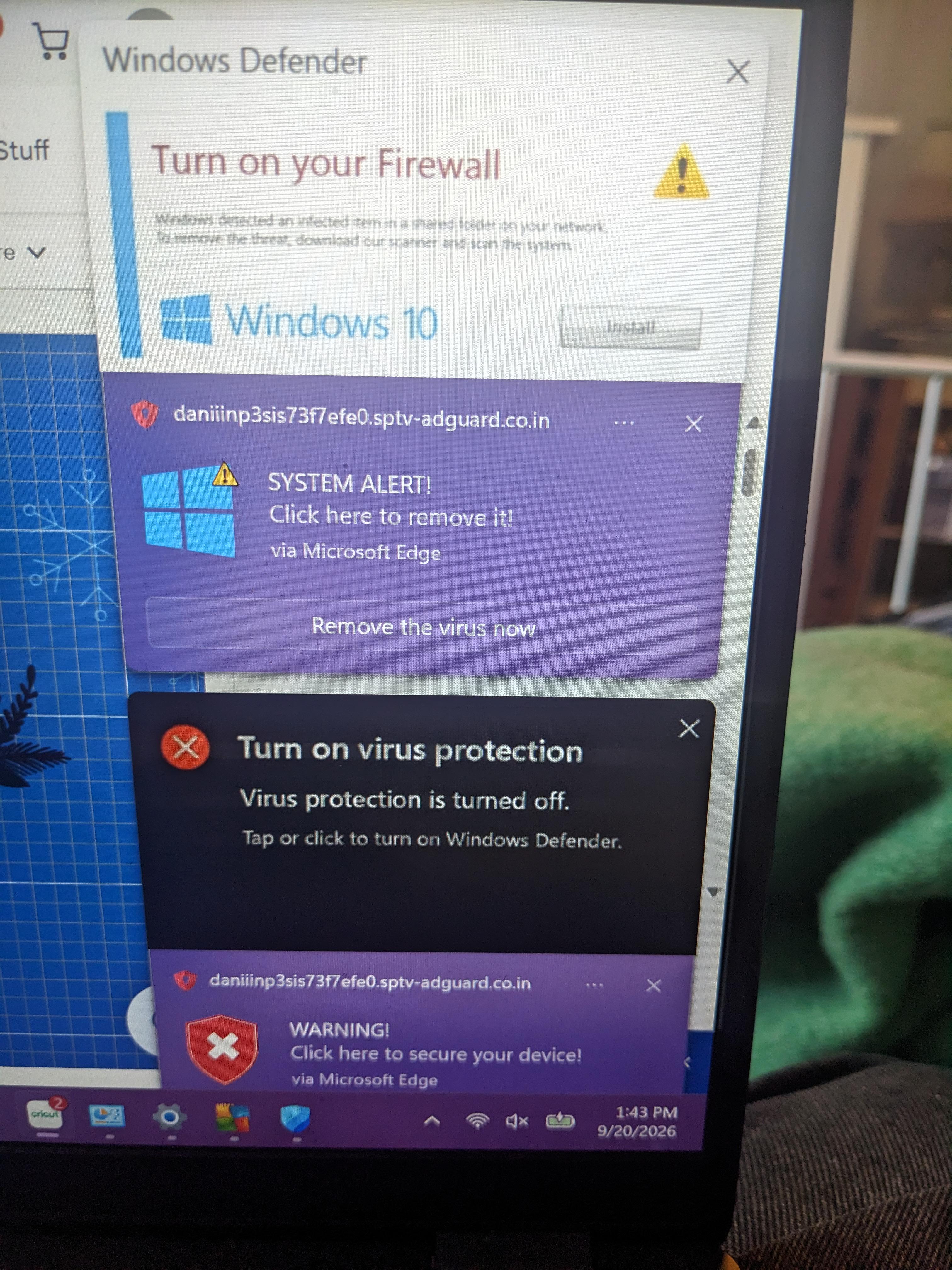
I clearly got duped yesterday and clicked on something I shouldn't and ever since this has been popping up on my screen.
I'm sure there's a way to get rid of it, but I'm not very computer savvy and don't know how.
I can, however, follow directions, so if someone can tell me how to get this crap off my laptop I'd be so grateful!
50
u/MitAllesOhneScharf 23d ago
Just browser notifications from a website trying to scare you and trick you into doing stuff.
If that's all you "allowed" you can just google "disable notifications for Edge" and either remove notication permissions for that sptv-adguard[.]co[.]in website or simply disable the feature alltogether.
5
u/B4DM4N12Z 23d ago
Yeah, I had this from a car website and had notifications about nsfw.
Deleting all cookies helped and stopped this (I deleted cache as well just in case).
2
u/_MoonFry 23d ago
which website? for research purposes ofc
1
u/B4DM4N12Z 22d ago
I don't remember now, but I don't think the alleged content being notified would be safe.
0
u/Czar_Chasm_ 23d ago
Also, maybe use a different browser (brave or firefox would default block a lot of this stuff)...
20
u/309_Electronics 23d ago
"via microsoft edge"
Random domain.
Yeah thats scareware. Harmless in itself (most of the times) but it is the first stage of a scam or malware attempt. Getting you scared so they can manipulate you easily into unwantedly coopersting with them.
Simply go to microsoft edge and disable notifications. Or click the 3 dots and dissble notifications that way.
7
u/Ryanoman2018 23d ago
"Click allow to continue"
*doesnt read that its asking to allow them to send you notifications*
"Why am I getting notifications?"
3
u/CurrentAcanthaceae78 23d ago
people dont even read popups anymore, they just click whatever button is closest to make it go away
4
u/WorldlinessNew4004 23d ago
Disable browser notifications completely or just check the notification settings on the browser and disable the ones that you don’t know and also ones you don’t need
1
u/B4DM4N12Z 23d ago
Deleting cookies stops this crap as well.
(I deleted cache as well, not sure if that made a change but I did it and it stopped).
4
4
u/UselessDood 23d ago
Disable notifications in your browser settings.
Ideally, you should also be using a proper adblocking setup. I suggest Firefox + Ublock Origin, but Ublock Origin Lite is available on Edge if you prefer.
3
u/SuperMichieeee 23d ago
When a website is asking you to allow notifications from your browser - do not click allow.
This is what happens, scam pretending to be real.
2
2
u/Designer-Crow-5470 23d ago
If a site ask you to "allow" something to continue - just close this site. It is a scam anyway.
2
u/DutyNo6526 22d ago
Good lord, I haven't seen annoying pop-ups since winxp days 😂 nowadays just make sure not to enable notifications on websites(literally why enable tho?) try to always click not allow for anything a website prompt you to allow
1
u/AutoModerator 23d ago
Request help with FRST and SecurityCheck from the trusted helper team
Please visit Providing or receiving help with FRST on the subreddit and share your 3 keywords returned from the website along with the details about your infection.
Once a malware removal expert or trainee sees it, they will reply in the thread about further steps. If you suspect an infostealer infection, please change all your passwords from a clean device immediately and do not use any of your accounts from the infected device.
If you need urgent help and cannot wait for one of our Malware Removal Experts:
Please follow these steps:
- From a different and clean device, change all your passwords:
- Disinfect your device from malware
- Preferred method: Perform a clean installation with a USB
I am a bot, and this action was performed automatically. Please contact the moderators of this subreddit if you have any questions or concerns.
1
23d ago
[removed] — view removed comment
1
u/computerviruses-ModTeam 23d ago
We appreciate you giving advice, however in this specific scenario your comment was deemed too generic, possibly harmful to the user or is not entirely relevant to their case from what they described and the details. It is also possible that you haven't elaborated on your advice enough, you haven't instructed the user on what to exactly do step by step or provided false sense of security to the user.
This includes (and is not limited to) recommending diagnostic tools for experts, recommending forensic steps that are unclear, recommending removal steps that are tricky to perform for the average home user and steps where it is easy for unexperienced user to cause damage to their device / operating system, determining false or true positives based on not enough input or data or recommending steps that are not entirely necessary.
We appreciate you trying to help regardless. If you want further explanation, you can reach out via modmail.
Please make sure to read and follow https://www.reddit.com/r/computerviruses/about/rules
1
23d ago
[removed] — view removed comment
1
u/computerviruses-ModTeam 22d ago
We appreciate you giving advice, however in this specific scenario your comment was deemed too generic, possibly harmful to the user or is not entirely relevant to their case from what they described and the details. It is also possible that you haven't elaborated on your advice enough, you haven't instructed the user on what to exactly do step by step or provided false sense of security to the user.
This includes (and is not limited to) recommending diagnostic tools for experts, recommending forensic steps that are unclear, recommending removal steps that are tricky to perform for the average home user and steps where it is easy for unexperienced user to cause damage to their device / operating system, determining false or true positives based on not enough input or data or recommending steps that are not entirely necessary.
We appreciate you trying to help regardless. If you want further explanation, you can reach out via modmail.
Please make sure to read and follow https://www.reddit.com/r/computerviruses/about/rules
1
1
22d ago
[removed] — view removed comment
0
u/computerviruses-ModTeam 22d ago
We appreciate you giving advice, however in this specific scenario your comment was deemed too generic, possibly harmful to the user or is not entirely relevant to their case from what they described and the details. It is also possible that you haven't elaborated on your advice enough, you haven't instructed the user on what to exactly do step by step or provided false sense of security to the user.
This includes (and is not limited to) recommending diagnostic tools for experts, recommending forensic steps that are unclear, recommending removal steps that are tricky to perform for the average home user and steps where it is easy for unexperienced user to cause damage to their device / operating system, determining false or true positives based on not enough input or data or recommending steps that are not entirely necessary.
We appreciate you trying to help regardless. If you want further explanation, you can reach out via modmail.
Please make sure to read and follow https://www.reddit.com/r/computerviruses/about/rules
1
22d ago
[removed] — view removed comment
1
u/computerviruses-ModTeam 22d ago
We appreciate you giving advice, however in this specific scenario your comment was deemed too generic, possibly harmful to the user or is not entirely relevant to their case from what they described and the details. It is also possible that you haven't elaborated on your advice enough, you haven't instructed the user on what to exactly do step by step or provided false sense of security to the user.
This includes (and is not limited to) recommending diagnostic tools for experts, recommending forensic steps that are unclear, recommending removal steps that are tricky to perform for the average home user and steps where it is easy for unexperienced user to cause damage to their device / operating system, determining false or true positives based on not enough input or data or recommending steps that are not entirely necessary.
We appreciate you trying to help regardless. If you want further explanation, you can reach out via modmail.
Please make sure to read and follow https://www.reddit.com/r/computerviruses/about/rules
1
u/Financial_Bear_5042 23d ago
Não e vírus n, e so alguma permissão de notificação desse site q você ativou sem querer
0
23d ago
[deleted]
1
u/WorldlinessNew4004 23d ago
That won’t work because they’re just notifications being sent on the browser rather than a virus that has been downloaded
-3
23d ago edited 23d ago
[removed] — view removed comment
1
u/computerviruses-ModTeam 23d ago
We appreciate you giving advice, however in this specific scenario your comment was deemed too generic, possibly harmful to the user or is not entirely relevant to their case from what they described and the details. It is also possible that you haven't elaborated on your advice enough, you haven't instructed the user on what to exactly do step by step or provided false sense of security to the user.
This includes (and is not limited to) recommending diagnostic tools for experts, recommending forensic steps that are unclear, recommending removal steps that are tricky to perform for the average home user and steps where it is easy for unexperienced user to cause damage to their device / operating system, determining false or true positives based on not enough input or data or recommending steps that are not entirely necessary.
We appreciate you trying to help regardless. If you want further explanation, you can reach out via modmail.
Please make sure to read and follow https://www.reddit.com/r/computerviruses/about/rules
-1
23d ago
[removed] — view removed comment
1
u/computerviruses-ModTeam 22d ago
We appreciate you giving advice, however in this specific scenario your comment was deemed too generic, possibly harmful to the user or is not entirely relevant to their case from what they described and the details. It is also possible that you haven't elaborated on your advice enough, you haven't instructed the user on what to exactly do step by step or provided false sense of security to the user.
This includes (and is not limited to) recommending diagnostic tools for experts, recommending forensic steps that are unclear, recommending removal steps that are tricky to perform for the average home user and steps where it is easy for unexperienced user to cause damage to their device / operating system, determining false or true positives based on not enough input or data or recommending steps that are not entirely necessary.
We appreciate you trying to help regardless. If you want further explanation, you can reach out via modmail.
Please make sure to read and follow https://www.reddit.com/r/computerviruses/about/rules
-1
u/B4DM4N12Z 23d ago
Did you accept cookies? I remember I accepted cookies to this one website (I was looking for car info but clicked accept on a shady website) and got these notifications (except for nsfw which freaked me out).
After I deleted all cookies and cache history from browser then it stopped.
Delete all your browser cookies and see if it helps. Maybe try without deleting cache as this will log you out of websites that you might not remember passwords for.
-5
u/petetrerice 23d ago
Disconnect from the internet for two weeks. Then douse with bleach, and then turn on. That should do something.
-3
u/Some-Panic8915 23d ago
Looks like you had windows defender turned off
4
u/cgm_discord 23d ago
No, Its a notification from a sketch website trying to trick people. Scareware.
-3
u/Some-Panic8915 23d ago
I mean how could that virus get past windows defender? Windows defender is surely off.
3
u/CurrentAcanthaceae78 23d ago
its not a virus, its microsoft edge allowing notifications from a website, because the user clicked "allow notifications" when a sketchy website asked
2
-5
0
u/edward_breus 22d ago
This is a Rogue Security Software. Its primary goal is to trigger panic so you will pay for a "full version" of the tool to clean the non-existent threats. Instead of fixing your computer, it steals your money, steals your credit card information, and often installs even worse malware. Just try a quick scan on Windows defender and put them into quarantine. If that doesn’t work, try AdwCleaner it’s free, doesn’t take up a lot of storage and should finish the job. If you don’t click on the Rogue notifications, you should be able to have enough time to remove it.
•
u/rifteyy_ Malware Removal Expert 22d ago
A lot of bad advice and junk comments in this post. It is now locked as proper solution has been provided.