r/computerviruses • u/Jealous-Intern-3013 • Aug 28 '26
Disinfection Help Im panicking i fell for this
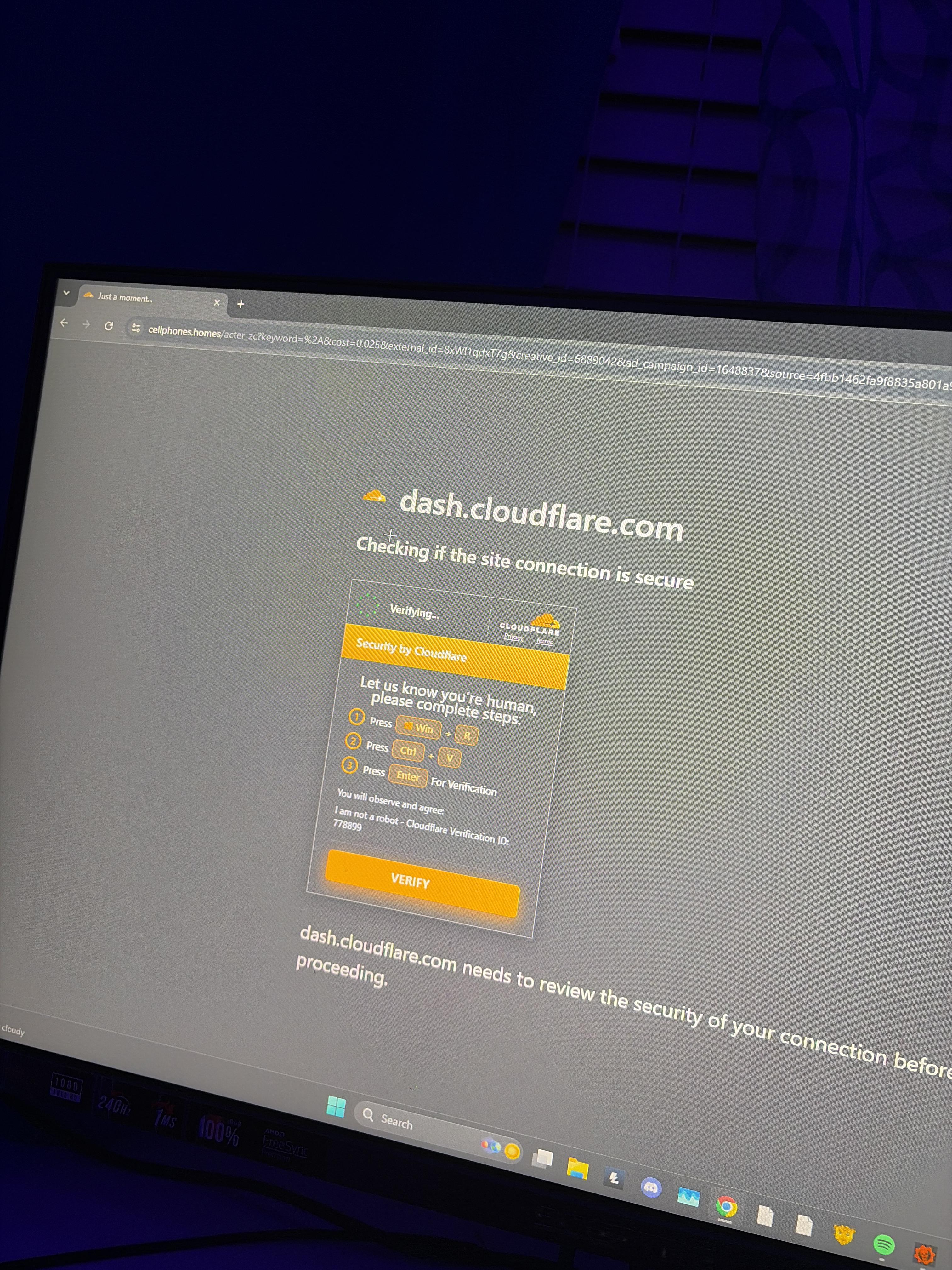
Anyone who sees, please dont bash me😭 this just occured 35 seconds ago because i instantly realized how special needs what i just did and then i see a viral feed instantly saying how smart it is dude my hearts racing
atp idc about my data im going to get to changing everything that matters on a seperate device could anyone help me with what i should do i really have no clue. Last time years ago i had a bad virus when i was younger with my first laptop and theres a local janky computer shop that charged 100$ to boot my laptop on something and hard reset it is that the route im gonna have to go (full resetting myself obviously)
dude im pissed as fuck.. and worried😭 i got my previous long-term MAIN emails locked in the last that made me forever be unablw to access shit so ik the risk im actually anxious someone please respond and comfort me wirh assistance and advice😭
15
u/k-da-coder Aug 28 '26
If you have any banking or important info then please change your password ASAP
-4
Aug 28 '26
[removed] — view removed comment
10
4
u/Infamous-Benefit-394 Aug 28 '26
Change all passwords, reinstall windows via USB. Trying to remove the virus is just gonna be riskier. Also, do not flash the USB on your infected computer, and do not change your passwords on your infected computer, change your passwords (that were on your infected device) on your phone. When reinstalling windows via USB, flash windows onto the USB on another clean laptop or computer.
1
u/Abs3nth Aug 28 '26
Quick question friend, where do I get the windows files for the USB?😅
2
0
u/Infamous-Benefit-394 Aug 29 '26
Download rufus on another computer, download the windows ISO on another computer, flash it via rufus. Find a youtube tutorial.
0
u/Least-Resort-6330 Aug 30 '26
rufus is optional
2
5
u/P-eater Aug 28 '26
What was pasted?
3
u/Abject-Explorer-3637 Aug 28 '26
some command that downloads another, I managed to get the script from the URL
1
u/Puzzleheaded_Bar483 Aug 28 '26
Would you mind sending me the link or the script? I want to see what exactly it does
7
Aug 28 '26
[removed] — view removed comment
12
Aug 28 '26
[removed] — view removed comment
4
u/Puzzleheaded_Bar483 Aug 28 '26
Well nevermind this guy did everything for me
2
u/dandandan2 Aug 28 '26
I mean, it's AI, but fair enough
2
u/Puzzleheaded_Bar483 Aug 29 '26
I don't think so, but even if it was this guy still made everything I wanted to do useless lol
2
2
u/computerviruses-ModTeam Aug 31 '26
You posted a clickable URL that may contain malware or phishing content. Users browsing this subreddit might accidentally click on the link, so we have removed your post. Please obscure suspicious links. For example, instead of https://www.reddit.com, use hxxps://www(.)reddit(.)com. Please make sure to read and follow https://www.reddit.com/r/computerviruses/about/rules
1
2
u/computerviruses-ModTeam Aug 29 '26
You posted a clickable URL that may contain malware or phishing content. Users browsing this subreddit might accidentally click on the link, so we have removed your post. Please obscure suspicious links. For example, instead of https://www.reddit.com, use hxxps://www(.)reddit(.)com. Please make sure to read and follow https://www.reddit.com/r/computerviruses/about/rules
3
u/LAB_Technologies Aug 28 '26
dog run a full virus scan regular and offline mode and add some extensions like malware bytes and port authority for your browser plus change your browser to librewolf
2
u/HPolz Aug 28 '26
So hummmmmm.......I did this too a couple days ago..I just realized what I did thanks to the post/comments or i would ve totally forgot. Nothing happened after this, no cmd was open or anything, I am running a Scan in a couple minutes when I turn on my PC. Should I be worried?
6
u/Lazy-Peanut-4587 Aug 28 '26
Disable wifi immediately on the device, Reinstall windows from a usb, and of course flash it on a safe device, do not assume any devices are safe, use a friends device, change all passwords from a clean device too, do bank and gmail first
-1
u/HPolz Aug 28 '26
This applies even if my full scan with malwarebytes and defender did not find any threats or anything? When this happened absolutely nothing popped up or anything and im not having any issues
1
u/Lazy-Peanut-4587 Aug 28 '26
I'd say so yeah, if you can find what exactly you pasted it would help but even if it just got the passwords its still bad, it also may not be flagged as malware by an av, but is still there. Its happened to me before
2
u/HPolz Aug 28 '26
I havent pasted anything...and if i try to press win+r now it does not open any windows so maybe it did not open back then and im safe? I have no clue about this type of stuff I am as stupid as a rock...is there a way i can check if got this shit?
1
u/Lazy-Peanut-4587 Aug 28 '26
I thought you said you did this??? If you never pasted anything then why say you did???
1
u/HPolz Aug 28 '26
Because this "verification" screen appeared to me and if i remember correctly i did the steps and passed it
1
u/Lazy-Peanut-4587 Aug 28 '26
What was the website it was for?
1
Aug 28 '26
[deleted]
2
u/Lazy-Peanut-4587 Aug 28 '26
Lets move to dms and also delete this comment, i've heard stuff about sailing the seven seas is against the rules here
1
u/AutoModerator Aug 28 '26
Request help with FRST and SecurityCheck from the trusted helper team
Please visit Providing or receiving help with FRST on the subreddit and share your 3 keywords returned from the website along with the details about your infection.
Once a malware removal expert or trainee sees it, they will reply in the thread about further steps. If you suspect an infostealer infection, please change all your passwords from a clean device immediately and do not use any of your accounts from the infected device.
If you need urgent help and cannot wait for one of our Malware Removal Experts:
Please follow these steps:
- From a different and clean device, change all your passwords:
- Disinfect your device from malware
- Preferred method: Perform a clean installation with a USB
I am a bot, and this action was performed automatically. Please contact the moderators of this subreddit if you have any questions or concerns.
1
u/k-da-coder Aug 28 '26
First thibg i would do is instantly shut it off
1
u/Jealous-Intern-3013 Aug 28 '26
wouldve done this if i knew that couldve saved me from having to about to have to reinstall everything over
1
1
u/k-da-coder Aug 28 '26
But if you have any more questions or concerns you can tell me. (Or maybe someone more experisnced, i just study computer science and a slight bit of IT work)
1
u/_gravelight Aug 28 '26
It wouldn't have. It's probably an infostealer - within seconds of you pressing enter, it's likely scraping data from your browser and other credential sources and sending them to an external server.
0
u/k-da-coder Aug 28 '26
Then unplug your router
2
u/a355231 Aug 28 '26
Unplugging the router would accomplish nothing.
-3
u/k-da-coder Aug 28 '26
Yes it would. If it hasnt already stole his data then it cant connect to the internet
4
1
u/k-da-coder Aug 28 '26
Next change ALL passwords because it likely already stole your info.
1
1
Aug 28 '26
[removed] — view removed comment
5
u/HerpDerpYaDummy Aug 28 '26
Delete this, your email address is visible.
3
u/blurfgh Aug 28 '26
God damn we are dealing with a genius here
1
u/Limp-Ad-2939 Aug 28 '26
Why’s he asking us(you guys, im clueless) he can outsmart the virus on his own
1
1
1
u/Round_Draw3772 Aug 28 '26
Ok so make sure you reformatted that one, and then you can still recover the emails if you ave the recovery, or contact google directly
1
Aug 28 '26
[removed] — view removed comment
3
u/RCKPanther Aug 28 '26
It is an instruction to trick the user int opening the computer's "run" feature, then pasting a command that downloads malware from a particular address. The type of malware varies but is usually quite severe malware that allows backdoor, remote access or grabs session information allowing it to grab and change account information.
3
Aug 28 '26
[removed] — view removed comment
1
u/RCKPanther Aug 28 '26
You can see that it is disguised as a CloudFlare procedure for non-bot/ddos verification. CloudFlare is a legitimate entity and such procedures are not uncommon. However, they would never ask for specific hotkey input like this
1
u/Maleficent_Owl9409 Aug 28 '26
Can anyone tell m what this is briefly ?
5
u/Light_Legend Aug 28 '26
The site enters a malicious command in your clipboard and make you execute it manually.
3
2
1
u/FishermanNo8646 Aug 28 '26
It’s a clickfix, though there’s variants, usually the copied command will get the actual payload on to the pc and executing it. It could be for example, mounting a network storage to deliver the actual payload and run it locally. It could also establish a c2 connection. At any rate, reinstalling the pc is highly recommended.
1
1
u/Puzzleheaded_Bar483 Aug 28 '26
This is 99% of the times an infostealer. Your steps are good, make sure to add 2FA if you haven't already and log out all sessions. You can find on this sub how to reinstall and completely wipe your data.
1
u/tobu329 Aug 28 '26
Sorry, I’m not too familiar with this attack. So when you’re navigating through the internet, some websites will show cloudflare to verify if you’re “human”. What makes this site a malicious attack?
1
u/suzuneu Aug 28 '26
Any website that instructs you to press Win+R, open Command Prompt, PowerShell, Terminal, or Bash, or paste something into the File Explorer address bar is malware. It is known as ClickFix. https://en.wikipedia.org/wiki/ClickFix
While legitimate web security services like the one provided by Cloudflare use a WAF, legitimate services will never instruct you to do things like that, and only require you to click a checkbox. If you are asked to do anything beyond what can be done entirely within the browser, it is a 99.99% scam.
1
u/tobu329 Aug 28 '26
Ahh that makes sense. Thank you for the explanation as well. It’s crazy to see how sophisticated these attacks are. Granted, it’s up to the user to the user to give them permission in order for them to infect your system. This was very insightful
1
u/Ok_Contest2640 Aug 28 '26
What does this thing do? Isnt ctrl+v just inserting what was copied?
1
u/SlimyTheSlime124 Aug 28 '26
It puts malicious code or a command into the clipboard which gets inserted into the terminal when you paste it.
1
u/Ok_Contest2640 Aug 28 '26
Man im sure if i stumbled on this web, id be even dumber and would just repeat all the steps but without copying anything, get disappointed that it didnt work and move onto another website
1
1
1
u/Pitiful_sasuge_9340 Aug 29 '26
- Disconnect the infected device form wi-fi
- Use a clean device (like your phone) to change all your passwords
- Backup everything important form laptop to an external HDD or USB stick
- Reinstall the OS on the infected device (make sure that you wipe every partition)
1
u/WanderinHawaiian Aug 29 '26
The shop i work at would just charge ya 170 for a cleanup, clears everything out and you can keep your data and everything
1
u/bigbeefbowski Aug 31 '26
Dude I see it all the time. Educate your people about what real reCaptchas are, learn the lesson and move forward.
1
u/meletiondreams Aug 31 '26
You installed an infostealer.
If you'd like to wipe here's how. Warning: I am not responsible for you messing up, or something, and everything you do here is on you. I am not responsible for your computer.
Disconnect from internet via your computer.
Transfer needed files to another usb or hard drive, do NOT transfer these file types: exe scr bat vbs, and ANYTHING you don't recognize, don't transfer browsers. Double and triple check the file extension, even after transfer. The drive you plugged in WILL be safer but will still be treated as infected.
Then, shutdown your PC, and reset all your passwords, on a different device from your PC. Do NOT boot back into your PC.
Then, on a seperate computer (could be a friend's PC, or something) download the windows 11 iso (https://www.microsoft.com/en-au/software-download/windows11), or use their install media to install it to an external usb. This USB will be wiped. (lookup how to flash an iso if you have to)
Next, plug the usb into your PC and get to your bootloader, depending on your PC it might be a different key you have to click when launching; refer to google, or to your manual if you have one, usually you can just google "[PC Model or motherboard] boot key".
This is a bit foggy now since I don't know your exact bios, you can search for "boot order" and move the usb to the top. Click save or exit, and boot.
Walk through the windows install making sure to delete all the partitons to be safe.
After install run malwarebytes just to be safe.
1
1
u/Charliemingay Sep 03 '26
Change passwords, enable 2fa (from a phone or tablet), disable WiFi or unglued Ethernet, flash windows freshly again or if ur getting a new device you can use your gpu cpu motherboard etc
2
u/Bitdefender_ Official Bitdefender Sep 04 '26
Hi! This is a ClickFix attack, the fake CAPTCHA page silently loaded a command into your clipboard, and when you pasted it into Run/PowerShell, it executed. The payload is almost always an infostealer, and it exfiltrates credentials within seconds, so disconnecting WiFi or running AV after the fact won't undo what already sent. The right move (which a few people above have already said) is: change all passwords from a clean device right now ,email and bank first, then do a full Windows reinstall from a USB flashed on a different machine. Don't just run a scan and call it done; some variants use registry persistence and will survive a scan but not a wipe.
Bitdefender experts have documented and investigated in-depth how infostealers infect systems and what you can do further to prevent this type of attack, in this article: https://www.bitdefender.com/en-us/blog/hotforsecurity/how-to-check-if-an-infostealer-stole-your-data
1
u/Natural-Inspector-25 Aug 28 '26
Well fuck, sorry to say, but I didn’t think anyone actually fell for these scams.
On what you can actually do.
I’d say easiest way is get a password manager on another device (if possible) and then go through all your accounts and get the password manager to make new complex passwords for every account
Make sure you get your bank and email accounts first, bank is just to save your money, but your email is supper important as they can use that to recover any account you change the password too
Once you have your email sorted. Start going though every account that you care about first.
Eg, games, discord, Facebook, google, stuff like that.
Then on your main device, just wipe it and start again.
Any important data should have been backed up.
2
u/GreatEmperorAca Aug 28 '26
lool I saw a hundred posts about those on reddit alone
1
u/Natural-Inspector-25 Aug 28 '26
I am still a bit baffled on how people cannot just use trusted sites.
Fair if none of the info was out thereBut it is everywhere on the internet.
Use the top 2-3 repack sites
And wait for anything else that isn’t on there to be put on there.
Be patient hahah0
u/Jealous-Intern-3013 Aug 28 '26
okay thank you dude it was so quick i didnt give it any thought especially because ive been having to do so much captcha stuff it made my
mind brush past this easier, yea this is like on the level of your device has been compromised call this number immediately level of stupidity that i fell for1
u/Natural-Inspector-25 Aug 28 '26
The most important thing is you will always be super suspicious now and hopefully it will never happen again
-4
Aug 28 '26
[removed] — view removed comment
1
u/computerviruses-ModTeam Aug 30 '26
Your post was removed because it is a personal attack on someone else or a group of users. Please be civilized. Please make sure to read and follow https://www.reddit.com/r/computerviruses/about/rules
49
u/Primary-Picture-5632 Aug 28 '26
You posted 8 days ago that you fell for the same thing...?