r/computerviruses • • May 25 '26

Disinfection Help How to remove this ?. It always comes whenever I turn on my laptop ,help
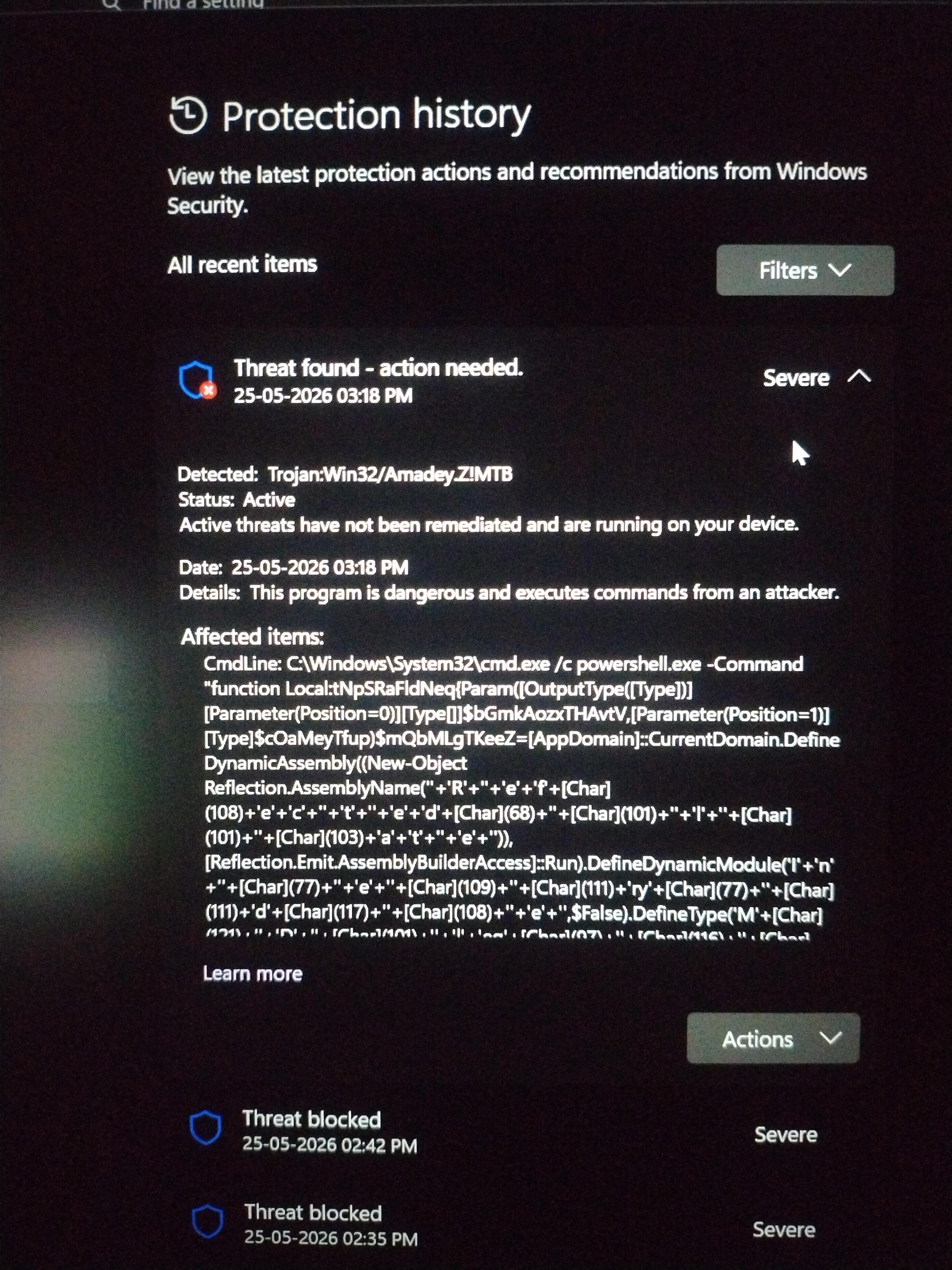
Post image
117 Upvotes

64 comments sorted by

47

u/rifteyy_ Malware Removal Expert May 25 '26

Hello, I am Roman and I will be helping you today. During the malware removal process, please follow the rules listed below to ensure everything goes as fast and smooth as possible:

  • Please make sure to read this whole introduction message so you understand the further steps.
  • If you are planning on resetting or reinstalling your device, do it please now. We are doing the malware removal process to disinfect your device so you can avoid reinstalling. If we go through the removal process and you decide to reinstall after, you would waste my time and your own time by doing these steps.
  • Avoid installing, downloading new software unless instructed - this also applies to antivirus software and scanners.
  • You are free to remind me that I forgot to reply to you if you do not receive an answer within 24 hours. Keep in mind that I am volunteering here and I am a full time student with a job.
  • Please do not follow other malware removal advice unless told otherwise.
  • Please follow all steps from step 1 to the last step, not the other way.
  • Only trusted malware removal experts listed in this r/computerviruses thread and other large malware removal forums (BleepingComputer, Malwarebytes, MalwareTips) have access to your logs via the website.
  • Please take your time to follow the steps properly.
  • You can ask any questions during the malware removal process.

If you are worried about the steps going on here, as a form of credibility you can find me on Malwarebytes Forums as a Malware Removal Expert, where we use the same methodology and toolset to remove malware. :)

[ Step 01 ] Restore point

Before any sort of removal, we need to make sure you have a restore point that you can revert to in case you face any sort of issues. This is absolutely necessary so please do not skip this step. Certain changes done by the removal process can not be properly reverted without a restore point.

Enable system restore

  1. Click Start or open Windows Search.
  2. Search for Create a restore point and open System Properties.
  3. In the System Properties window, go to the System Protection tab.
  4. If the 'system' drive (usually C:\ drive) protection is turned on, System Restore is already enabled on your computer. If the 'system' drive protection is off, go to point 5.
  5. Click Configure.
  6. Select Turn on system protection
  7. Click Apply.
  8. Click OK to confirm.

Create a system restore checkpoint

  1. Click Start or open Windows Search.
  2. Search for Create a restore point and open System Properties.
  3. In the System Properties window, go to the System Protection tab.
  4. Click Create.
  5. Call the restore checkpoint "FRST restore point" exactly please, so I can search it up fast and verify it is created properly in your logs
  6. Click Create.
  7. Click Close.
  8. Click OK.
  9. You should get a popup that it was successfully created and I will also verify that it was properly created with the results of scans from next steps.

[ Step 02 ] Farbar Recovery Scan Tool (FRST)

FRST is a malware diagnostics tool that will list all entries that are popular and could contain traces/mentions of malware, such as start up entries, services, scheduled tasks and many more.

FRST does not contain any personal information other than your username and computer name, there is no other sensitive information disclosed.

IMPORTANT: If your Windows operating system is in other language than English, please save the FRST executable file with the filename FRSTEnglish.exe to ensure that the logs are in English so I can understand them.

  • Please download FRSTx64 and save the file to your Desktop as FRSTEnglish.exe.
  • Right-Click FRSTEnglish.exe and select Run as Administrator
  • Click Yes to the disclaimer.
  • Ensure the Addition.txt box is checked.
  • Click the Scan button and let the program run.
  • Upon completion, click OK, then OK on the Addition.txt pop up screen.
  • Two logs (FRST.txt & Addition.txt) will now be open on your Desktop. Copy & paste the contents of each log to https://malwareanalysis.cc/upload/rifteyy and press "save log".
  • Note: Please make sure you are uploading the logs after your current Reddit username.
  • The site will return a keyword for each log - reply back here with the keywords.

[ Step 03 ] SecurityCheck scan

SecurityCheck allows me to gather a list of unwanted, risky, vulnerable and out-of-date applications. It also allows me to send you a direct link to an update. An unpatched system is more vulnerable to malware.

  • Download SecurityCheck by glax24 & Severnyj and save it to your Desktop.
  • If Windows SmartScreen blocks the file from running, click on More info and Run anyway.
  • Extract the ZIP archive, then right-click on the SecurityCheck.exe and select "Run as administrator" and confirm the User Account Control popup.
  • Wait for the scan to finish. It will open a text file named SecurityCheck.txt
  • Please copy the file content (CTRL + A then CTRL + C) and paste it on https://malwareanalysis.cc/upload/rifteyy
  • The site will return a keyword for the log - reply back here with the keyword.

So, in your next reply, make sure you are sending the following:

  • Keyword for FRST.txt
  • Keyword for Addition.txt
  • Keyword for SecurityCheck.txt

Thanks!

Note: If anyone else who is facing malware-related issues is reading this and wants help with FRST and SecurityCheck, please create your own thread with the keywords sent to the general channel. I am flooded with requests and there is several other removal experts who review the logs and may reply faster than me.

14

u/diabolicaLllllll May 25 '26

I will do it but I just let you wanna know that it gets detects and then windows security removes it , it like a loop whenever I open my laptop it gets detected and removed

5

u/diabolicaLllllll May 25 '26

And yeah maybe these updates are not installing probably because of that trojan right? . Its been a week they dosent download

2

u/diabolicaLllllll May 25 '26

Can I save it in diffrent folder or is it necessary to save it on desktop?

2

u/rifteyy_ Malware Removal Expert May 25 '26

preferably Desktop

2

u/diabolicaLllllll May 25 '26

And how much time will it take ?? Should I play game till then??

1

u/diabolicaLllllll May 25 '26

I just moved it to a folder in c so my brother dosent get any suspicious

5

u/rifteyy_ Malware Removal Expert May 25 '26

you have malware on your PC, I am sure that your brother would be mad about the malware and not the fact you are trying to get rid of it

2

u/diabolicaLllllll May 25 '26

addition.txt - savvy-hash

frst.txt - tidy-combo

securitycheck.txt -  jade-guild

2

u/rifteyy_ Malware Removal Expert May 25 '26

[ Step 01 ] Updates

If you are having a problem updating something, do not want to update something at all or do not want to uninstall an application, please let me know.

Please update the following software:

Please let me know whether you recognize this remote desktop software:

  • Chrome Remote Desktop Host v.148.0.7778.23
  • UltraViewer version 6.6.124 v.6.6.124

Please remove the following software:

  • WebAdvisor by McAfee

[ Step 02 ] FRST Fix

I created a custom fixlist for you at the link Fixlist only for Fixlist only for Fixlist only for diabolicaLllllll - use the website's download button and save it in the same folder where your FRSTEnglish.exe or FRST64.exe file is located in, which is C:\Users\chitt\OneDrive\Desktop\FRSTEnglish.exe.exe for you. It is necessary for the filename to be Fixlist.txt.

This fixlist will remove the following: malicious entries (remains, active malware), invalid entries (e.g. tasks that start a non-existent file, services that point toward a non-existent file), temporary files (files in temporary directories, cache, recycle bin and more). We will also be quick-scanning with HitmanPro and AdwCleaner from Malwarebytes using the fixlist.

  • For the fix process, please ensure you are connected to the internet.
  • Please run the fix only once.
  • Please be patient; the fix may take up to 60 minutes. After that, it is going to be automatically ended.

Save all work, close everything that is open (else it will be forcefully closed by FRST without saving) and then run FRST again as administrator and press the Fix button, let the script work, clear the entries and restart on it's own and after it restarts the device, there should be a file Fixlog.txt in the same folder as the fixlist.txt.

I'll need to see it's content the same way like before - uploading to https://malwareanalysis.cc/upload/rifteyy/?u=diabolicaLllllll again and sending the keyword in your reply.

[ Step 03 ] ESET Online Scanner

  1. Download ESET Online Scanner
  2. Right-click on the esetonlinescanner.exe and select "Run as administrator" and confirm the User Account Control popup
  3. Click ⁨Get started⁩;
  4. Agree to the terms of use;
  5. Decline both telemetry options;
  6. Click ⁨Custom Scan;
  7. Click ⁨Save and continue;
  8. Select ⁨Enable ESET to detect and quarantine potentially unwanted applications;
  9. Click ⁨Advanced settings;
  10. Enable ⁨Detect potentially unsafe applications;
  11. Click the back arrow;
  12. Click ⁨Start scan;
  13. Note: The scan may take up to several hours.
  14. Once complete, click ⁨Save scan log and upload the ⁨.txt file to https://malwareanalysis.cc/upload/rifteyy/?u=diabolicaLllllll and reply with the keyword.

[ Step 04 ] New SecurityCheck scan

SecurityCheck allows me to gather a list of unwanted, risky, vulnerable and out-of-date applications. It also allows me to send you a direct link to an update. An unpatched system is more vulnerable to malware.

We need a new scan to ensure that all updates were applied properly and all applications uninstalled correctly.

  • Note: If SecurityCheck is already on your device, you can use the previous version and skip the next few steps regarding downloading and installation.
  • Download SecurityCheck by glax24 & Severnyj and save it to your Desktop.
  • If Windows SmartScreen blocks the file from running, click on More info and Run anyway.
  • Extract the ZIP archive, then right-click on the SecurityCheck.exe and select "Run as administrator" and confirm the User Account Control popup.
  • Wait for the scan to finish. It will open a text file named SecurityCheck.txt
  • Please copy the file content (CTRL + A then CTRL + C) and paste it on https://malwareanalysis.cc/upload/rifteyy/?u=diabolicaLllllll
  • The site will return a keyword for the log - reply back here with the keyword.

[ Step 05 ] New FRST scan

FRST is a malware diagnostics tool that will list all entries that are popular and could contain traces/mentions of malware, such as start up entries, services, scheduled tasks and many more.

FRST does not contain any personal information other than your username and computer name, there is no other sensitive information disclosed.

IMPORTANT: If your Windows operating system is in other language than English, please save the FRST executable file with the filename FRSTEnglish.exe to ensure that the logs are in English so I can understand them.

  • Note: If FRST is already on your device, you can use the previous version and skip the next few steps regarding downloading and installation.
  • Please download FRSTx64 and save the file to your Desktop as FRSTEnglish.exe.
  • Right-Click FRSTEnglish.exe and select Run as Administrator
  • Click Yes to the disclaimer.
  • Ensure the Addition.txt box is checked.
  • Click the Scan button and let the program run.
  • Upon completion, click OK, then OK on the Addition.txt pop up screen.
  • Two logs (FRST.txt & Addition.txt) will now be open on your Desktop. Copy & paste the contents of each log to https://malwareanalysis.cc/upload/rifteyy/?u=diabolicaLllllll and press "save log".
  • Note: Please make sure you are uploading the logs under your current Reddit username.
  • The site will return a keyword for each log - reply back here with the keywords.

So, in your next reply, make sure you are sending the following:

  • Keyword for Fixlog.txt from step 2
  • Keyword for ESET Online Scanner scan from step 3
  • Keyword for new SecurityCheck.txt from step 4
  • Keyword for new FRST.txt from step 5
  • Keyword for new Addition.txt from step 5

Thanks!

Note: If anyone else who is facing malware-related issues is reading this and wants help with FRST and SecurityCheck, please create your own thread with help request. I am flooded with requests and there is several other removal experts who review the logs and may reply faster than me. The steps listed in here are specific for this the user diabolicaLllllll and following them may have negative effects for you.

0

u/diabolicaLllllll May 25 '26

Fixlist is running but can I run eset scanner Tommorow I wanna sleep😭

1

u/rifteyy_ Malware Removal Expert May 25 '26

Sure, you can finish it tommorow

1

u/diabolicaLllllll May 26 '26

How much time eset scanner will take? I have ssd

1

u/rifteyy_ Malware Removal Expert May 26 '26

I don't know, few hours probably

1

u/diabolicaLllllll May 26 '26

So now this are the last steps right?

2

u/rifteyy_ Malware Removal Expert May 26 '26

No. I need the new logs and also one of my colleagues informed me that you have a rootkit.

Considering it was at minimum 19 days since the initial infection, it is very risky to keep using the device, since you had the malware running persistenly and the rootkit has the ability to hide processes, network connections and registry values.

  • You can remove the visible signs of this infection, but due to the nature of this type of malware, no one can guarantee the trustworthiness of your computer. A backdoor or RAT gives the attacker complete access to your system, allowing them to steal data, install additional malware, or monitor your activity.
  • This means that at some point the attacker was able to interact with your PC (see your desktop, view files, open programs) just like you are able to do so. For this reason, we do not recommend manual malware removal, because the malware could be embedded deeper in the system or able to manipulate with the removal process and making it ineffective.
  • If your computer was used for online banking, has credit card information or other sensitive data, using a non-infected computer/device you should immediately change all account information (including those used for banking, email, eBay, PayPal, online forums, etc). Consider these accounts already compromised.
  • I recommend you read and follow this guide on how to deal with the aftermath of info stealers: https://rifteyy.org/report/the-ultimate-guide-to-infostealers - specifically the section "How to properly secure my accounts".

If you want to use this computer for anything important like online banking or logging in to your accounts, follow one of these videos:

1

u/diabolicaLllllll May 26 '26

So should I reinstall windows ?

→ More replies (0)

1

u/diabolicaLllllll May 26 '26

I talked to my brother about this so he said he uses a app which gives access to his boss so maybe it can be triggering or is it the infection

0

u/diabolicaLllllll May 25 '26

The fixlist was done now but it didn't restarted my laptop it just got done and it got closed automatically

0

u/diabolicaLllllll May 25 '26

fixlog - crimson-elk

here it is rest i will provide tommoreow going for sleep

1

u/diabolicaLllllll May 25 '26

I did now can I delete all the files and app? Because it is used by my brother too so

1

u/polpolik2 Moderator May 25 '26

You need to talk to your brother.

if he has accounts on there, they could be compromised.
if you dont tell him, he could lose all access. Or worse, lose money and risk identity teft among other things.

I am not knowledgeable what kind of virus this is, but I saw someone mentioning an infostealer.
You need to take this more serious imo. If it indeed is an infostealer, you should do the following:

If the pc is clean now, you need to:

Change ALL (including your brothers) passwords ASAP - starting with bank and email.
Enable 2FA

Use the sign out everywhere option where possible - or evaluate active sessions and remove any you dont recognize.

You need to stay very alert next days to see if you dont get weird logins.
Tell ur brother.

2

u/diabolicaLllllll May 25 '26

And in this like is it safe ? , does it mean you are getting access to my laptop? .

13

u/rifteyy_ Malware Removal Expert May 25 '26

No, I am not getting access to your laptop. It's your choice whether you share the logs or not.

0

u/diabolicaLllllll May 25 '26

Yeah I will do it just give me a day I will share it

9

u/polpolik2 Moderator May 25 '26

The malware experts here have helped many people including me. They are excellent at what they do.

The first step of FRST is to identify malware and unwanted programmes. Check the pinned posts for more information on that.

If you dont want to proceed with an FRST, you can always reinstall windows (deleting all files) preferrably from an USB. But please if so, tell Rifteyy/us here so he doesnt spend time analyzing anything while you reset. That would be a waste of time.

-9

u/diabolicaLllllll May 25 '26

No I am not gonna reinstall but will it be removed permanently?

6

u/polpolik2 Moderator May 25 '26

I cant speak for Rifteyy_ but I assume that he will be able to delete it permanently if the steps are followed correctly. The first step is the identification part (follow his instructions in detail), second step will be removal trough a fixlist.

Not just this specific malware/trojan will be targeted though. I assume he will look at antivirus exclusions, harmful extensions, other harmful programmes etc.

-1

u/diabolicaLllllll May 25 '26

Ok guys , but you read that it gets removed by security and then again comes when I open laptop

9

u/Kerrus May 25 '26

if it's 'coming back' then it's not really being removed.

7

u/[deleted] May 25 '26

[removed] — view removed comment

-2

u/diabolicaLllllll May 25 '26

Yeah so how to solve it ?

5

u/MeRoXas May 25 '26

Are you five?

1

u/KazefQAQ May 26 '26

Follow the steps the expert provided

9

u/Available-Note-9652 May 25 '26

That’s a pretty bad info stealer I’d change all your passwords from a clean device.

4

u/myredditorsomething May 25 '26

-Get usb stick -use a DIFFERENT computer to download windows onto it -plug into computer and boot from usb -reïnstall windows completely

2

u/_ripits May 25 '26

Download Autoruns and remove it

2

u/h4ckth3pl4ne7 May 25 '26

So I would RedStick the PC. Every single byte of data, doesn't matter how meaningful any of the data is, it needs to go. Completely wipe it. I would then fully reinstall windows on a different PC with different hardware, and lock this one away.

4

u/[deleted] May 25 '26

[removed] — view removed comment

2

u/h4ckth3pl4ne7 May 26 '26

It's meant as a deterrent. Play stupid games, win stupid prizes, effectively.

1

u/[deleted] May 26 '26

[removed] — view removed comment

1

u/diabolicaLllllll May 26 '26

Yeah i am following only expert one steps

-4

u/Eddodido8898 May 25 '26

Get another usb stick and another computer. Download any linux (mint) would be windows user friendly then burn to your usb stick then install to this machine ASAP. Get rid of that slop shit

3

u/diabolicaLllllll May 25 '26

Thanks for the help but a professional has helped gonna try it

1

u/sign-me-here May 25 '26

If it is someone who has reached out on Reddit through DMs, they may try to steal your info/infect you further.

1

u/diabolicaLllllll May 25 '26

Oh is it ? But swoosh I didn't got any dms the convo all is here and yeah I will be alert

2

u/sign-me-here May 25 '26

Just wanted to make sure! I didn’t see anyone else comment it, so I figured it would be safer to deliver that warning just in case.