r/chromeos • • Feb 05 '26

Announcement Small update/clarification to our rules on AI

31 Upvotes

Hello all,

Just wanted to share a clarification, and expansion of our rules about AI generated posts and comments on r/chromeOS.

First off, a reminder that responding to support requests on this subreddit with responses directly generated from any LLM has been not allowed under Rule 8: Effort Must be Made When Requesting and Providing Help for over a year now.

The fact is, most people come to r/chromeOS to speak to people. If people wanted to get answers from LLMs, they're accessible enough that people could ask them themselves. It just seems like a slap in the face to come for help and to just get a lazy response from someone who copy/pasted a (usually incorrect) response from Gemini or another LLM, which the poster could have done themselves if they wanted.

In addition, recently there's been a lot of misinformation being posted on the subreddit about recent changes to ChromeOS, updates about both ChromeOS and the upcoming AluminiumOS, and new devices, usually only crediting Gemini as a source. There has also been plenty of AI-generated reviews and self promo (the latter primarily posted by bots).

In general, while I know it seems like we’ve been sleeping as mods (yes, we’ve seen the reports calling us out on that), we would still like to try our best to try and keep this community higher quality.

We’ve decided that due to this, we wanted to officially expand this rule to include all posts and comments generated by AI. This rule primarily has LLMs in mind.

This does not include discussion about AI features being built into ChromeOS. Discussion of AI features being built into the OS is allowed.


r/chromeos • • Mar 07 '24

Announcement Announcement - "chrultrabook" posts, AKA regarding attempting to put Windows or another OS onto your Chromebook, will no longer be allowed.

90 Upvotes

Hey there!

In short, as of today, this subreddit will be removing and redirecting posts that seek advice on replacing the operating system on your Chromebook.

In the past these posts were allowed with a disclaimer that better support would likely be found elsewhere, such as r/chultrabook and their associated communities. However that subreddit is now archived and they now only provide support on their forum.

Since then there has been a rise in posts like this here, and we're simply not equipped to provide meaningful support. We've received lots of feedback over the past few months and the general consensus was that everyone is better served if these posts are now permanently directed elsewhere.

To be clear, we are not discouraging anyone from attempting this process; it's still cool, (potentially) fun and can unlock more utility from your device! The only change is that posts seeking support for this will be removed.

Thanks for understanding!


Helpful Links


r/chromeos • • 1d ago

News Chromebook Snapdragon 7c booted into native Android 16

Post image
92 Upvotes

Got Android 16 (LineageOS 23.2) booting on Snapdragon 7c Chromebook hardware. It runs directly via a single boot image that bundles device trees for all 47 manufacturing SKUs and board revisions across the entire Google Trogdor platform, without touching the underlying board firmware.

Because they all share the same baseboard design, the image is structured to support almost the entire Snapdragon 7c and 7c Gen 2 lineup—including devices like the Duet 5, HP x2 11, Acer Spin 513, ASUS CM3, and Galaxy Chromebook Go. Core hardware like touch, audio, Wi-Fi, and Bluetooth is already functional.


r/chromeos • • 2h ago

Troubleshooting Acer Chromebook Spin 713 screen issues

1 Upvotes

Purchased new in 2021. Used sparingly until about a year or two ago, and now it's become my every day at-home PC. Noticed lines and color distortion on my screen last night. Gets progressively worse over a use session. Asked Google AI, and they suggested updating ChromeOS (done) and doing a Power Reset (haven't done this yet).

Just wondering if anyone's experienced a similar issue, and if I'm likely looking at a hardware issue? If so, is it worth spending the money to get it fixed, or should I simply spring for a new CB?


r/chromeos • • 8h ago

Troubleshooting Sometimes no OSK appears when on tablet mode. Affects Duet 3 and Duet 11".

Enable HLS to view with audio, or disable this notification

3 Upvotes

At least a year that this regularly occurs on my Duet 3 and now even happens on the recently bought Duet 11". This is a serious UX bug that I would expect on some third party OS, not on Chrome OS.


r/chromeos • • 6h ago

Googlebook No le veo el caso a Googlebook, prefiero una chromebook

3 Upvotes

He tenido la oportunidad de tener chromebook de gama altay media, así como tablet chromebook. Me encanta tener un escritorio ligero que inicia con rapidez, silencioso, sin distracciones y a la vez de disponer aplicaciones android y linux para necesidades ocasionales o específicas. Me parece genial disponer de lo mejor de tres mundos. Como usuario de tablet, me parece estupendo que disponga de salida de video y conectar un teclado y una pantalla y tener una pc de escritorio. A su vez el modo tableta cumple sin ser de lo mejor ni competir con ipad, pero cumple en poder usarse adecuadamente.He leido todos los fallos y quejas de Googlebooks y considero quese debió de invertir en chromeos y no comenzar de cero en android. Android no deja de ser un sistema pensado en el movil y sus aplicaciones lo mismo. ChromeOS es una joya que Google no supo vender.


r/chromeos • • 13h ago

Discussion Should I just get a new computer that isn't a chromebook? I tried clearing my chromebook storage and realized 14.8gb is JUST for the system. I only have a few hundred photos (most under one MB) and one app (Roblox) and I'm almost out of storage. Some apps aren't even opening anymore.

Post image
4 Upvotes

Like is there any way to lower the system storage? This is insane.


r/chromeos • • 8h ago

Troubleshooting How to bypass automatic updates stopping…

Thumbnail tiktok.com
0 Upvotes

This is so weird I had this customer bring it in… this is what I had to do to fix this….


r/chromeos • • 14h ago

Troubleshooting Sometimes Downloads Fail to Download

2 Upvotes

Frequently I download a pdf to replace an existing pdf and the download does not work. The file will show 0 Bytes. Anyone have any ideas why this happens?


r/chromeos • • 11h ago

Troubleshooting Chrome Restore Pages in Crash Loop for a month on Chromebook

1 Upvotes

Chrome on my Chromebook crashed (an ad-heavy page being the straw log that broke the camel with too many tabs (though killed)). On reopening, I get "Restore pages?" popup, click "Restore" and it crashes. It's been like this for over a month! It used to help if I turned off WiFi to prevent tabs reloading all at once. But no longer. I'm adept at using the Task Manager to kill tabs hogging memory or processor. But now Chrome base itself doesn't seem to cope with all the tabs. How do I jiggle it to shake off the offending bits, just load my tabs, give me those titles & URLs?

I've been using my older Macbook where Chrome hasn't crashed in years (yes, I once kept my Macbook & Chrome session up for over a year! I know, dumb, not updating, but point is, it did not crash once!). I don't see my Chromebook in "other devices" in Chrome history from my Macbook. I had Session Buddy, but had it disabled (dumb, I know!), enabled it on Macbook, so it's now enabled on Chromebook. But crash has already happened, so would Session Buddy be able to extract that session? I also thought about clearing the cache. But I'm afraid of losing the "Restore Pages?" popup and the stored state, if I do too much before clicking Restore. And given it's Chromebook, no way to get to Chrome session files to extract tab titles/URLs, is there?

I did post this on r/chrome, but ChromeOS is crucial in this crash and its solution, so I ask here.


r/chromeos • • 9h ago

Buying Advice Agentic Access to File System & Desktop

0 Upvotes

10+ yr ChromeOS user. It was the optimal OS for me, until AI came along and began to offer features that will never be possible on ChromeOS. Most notably, the ability to have agentic control over the desktop and file system. Claude in Chrome is great, but depending on the task it requires the user to not use the computer while it works, among other limitations.

My 202 Acer Spin 713 is on the fritz, and I need something new. Beucase of the value I would get form having an agentic AI do work for me on my desktop and in my file system, I am considering switching to Linux. I would love Googlebooks to work, but Google is not being very clear on how things will work in this regard:

From what I can tell, the Antigravity app will allow Gemini to perform local tasks for users with access to the file system and desktop. Not just the sandboxed Linux container. Is this accurate; and is there any indication as to whether the platform would allow Anthropic & OpenAI to get this access for Claude & Codex?


r/chromeos • • 19h ago

Buying Advice I have bought a Lenovo Chromebook Plus 2-in-1 14ITN10 but...

3 Upvotes

Hi everyone,

I have bought a Lenovo Chromebook Plus 2-in-1 14ITN10 (i3 N355 with 8gb ram ddr5 and 256gb disk) for 439€ in the recent Amazon prime days. The thing is that I am not sure if I should keep it or not...

It would be my first experience with Chromebook but I have read too manu bad things so I'm in real doubt.

My use case

I'm pretty tech savvy, gamer and developer. I'm aware of the ChromeOS platform limitations. My desktop pc is pretty beast so I was looking for a cheap laptop to connect with it via RDP/Moonlight. I just need.good battery life because the compute power will be provided by the desktop, but I don't want a plastic machine.

In addition I have a Google Pixel 8 so I have read the integration between both devices will be great. And probably I will be able to try GooglebookOS (terrible OS name) so that's a plus for me.

For all this reasons this Chromebook Plus seemed to be a good option for me. I would prefer a Kompanio ultra 910 but it's impossible to find one in Spain, don't know why.

The doubts

- Is this laptop performance good enough? The battery?

- Is ChromeOS really that limitating?? Just in case I wasn't able to connect my desktop.

- Is the screen good enough?

- Will be worth to buy a Chromebook Plus just to try GooglebookOS for half the entry price?

Thank you.


r/chromeos • • 1d ago

Discussion mejorar rendimiento de mi pc

1 Upvotes

quiero jugar algunos juegos que estoy instalando mediante linux, pero algunos no van tan bien y estuve investigando y pues dicen que se puede mejorar los juegos de android en las chromebook de alguna forma, pero ni idea, mi pc tiene estas especificaciones Intel(R) Core(TM) i7-8650U CPU @ 1.90GHz (8 subprocesos, 4.200 GHz) y 16 de ram, lo que quiero jugar es el dbz budokai 3 que salio hace poco para android


r/chromeos • • 1d ago

Troubleshooting Weird Scrolling Artifact in Tablet Mode: Bottom Screen Glitch from Tab Bar Hiding

Enable HLS to view with audio, or disable this notification

2 Upvotes

Anyone see this and fix it on their convertible Chromebook? This is an Asus CM32, with the keyboard cover folded back so it is in "Tablet Mode," and the OS updated this morning to 154.0.8037.151 (64-bit) but it has been happening for about 1 or 2 months throughout updates. Before that, it was fine.

As you can see, when I scroll UP for the first time, the Tab Bar/Address Bar slides up and away, and it makes a similarly sized block appear at the bottom of the screen, which only disappears when I stop scrolling. If I keep scrolling up, the bottom block does not appear UNTIL I scroll down again, which forces the Tab Bar/Address Bar to appear again, and then the next Scroll Up makes the block at the bottom appear again.

If I go "Full Screen" to hide the Tab Bar/Address Bar completely, then the lower block never appears when scrolling.

It happens in both Portrait and Landscape screen orientations.

So, anyone else see this? And might anyone else have a solution? It does NOT happen in "laptop mode" when I scroll with my finger, the touchpad, or the arrow keys.


r/chromeos • • 2d ago

Googlebook What are your opinions on Googlebooks after what we've seen till now?

29 Upvotes

r/chromeos • • 2d ago

Troubleshooting I wanna run ChromeOS in ChromeOS in a Linux VM.

2 Upvotes

So I have the Crostini / Debian Container on my Chomebook. With that I wanna run older ChromeOS versions on my Chromebook in VM Software for Debian because I don't have another laptop. Is their any downloads or versions of ChromeOS, any Debian VM software. Just any info to help me.


r/chromeos • • 2d ago

Buying Advice Request: Is "Lenovo IdeaPad Slim 3" enough for an elderly parent?

2 Upvotes

Lenovo IdeaPad Slim 3 Chromebook: MediaTek Kompanio 540, 14" WUXGA, 4GB, 64GB eMMC is the full name of the chromebook I found on sale.

It's only going to be used for emails, the occasional google meet, and shopping. Maybe some light light light gaming (solitaire type games?). I know I should be looking for 8gb of ram, but she's going to be annoyed by the price. She is already complaining about me not "spending too much". But to be clear, my budget is "flexible" in that I'd be willing to pay more if a better chromebook could actually be useful for her.

This sale is for under $200.

Thanks

(touchscreen and a bright screen are probably two key points for her)


r/chromeos • • 2d ago

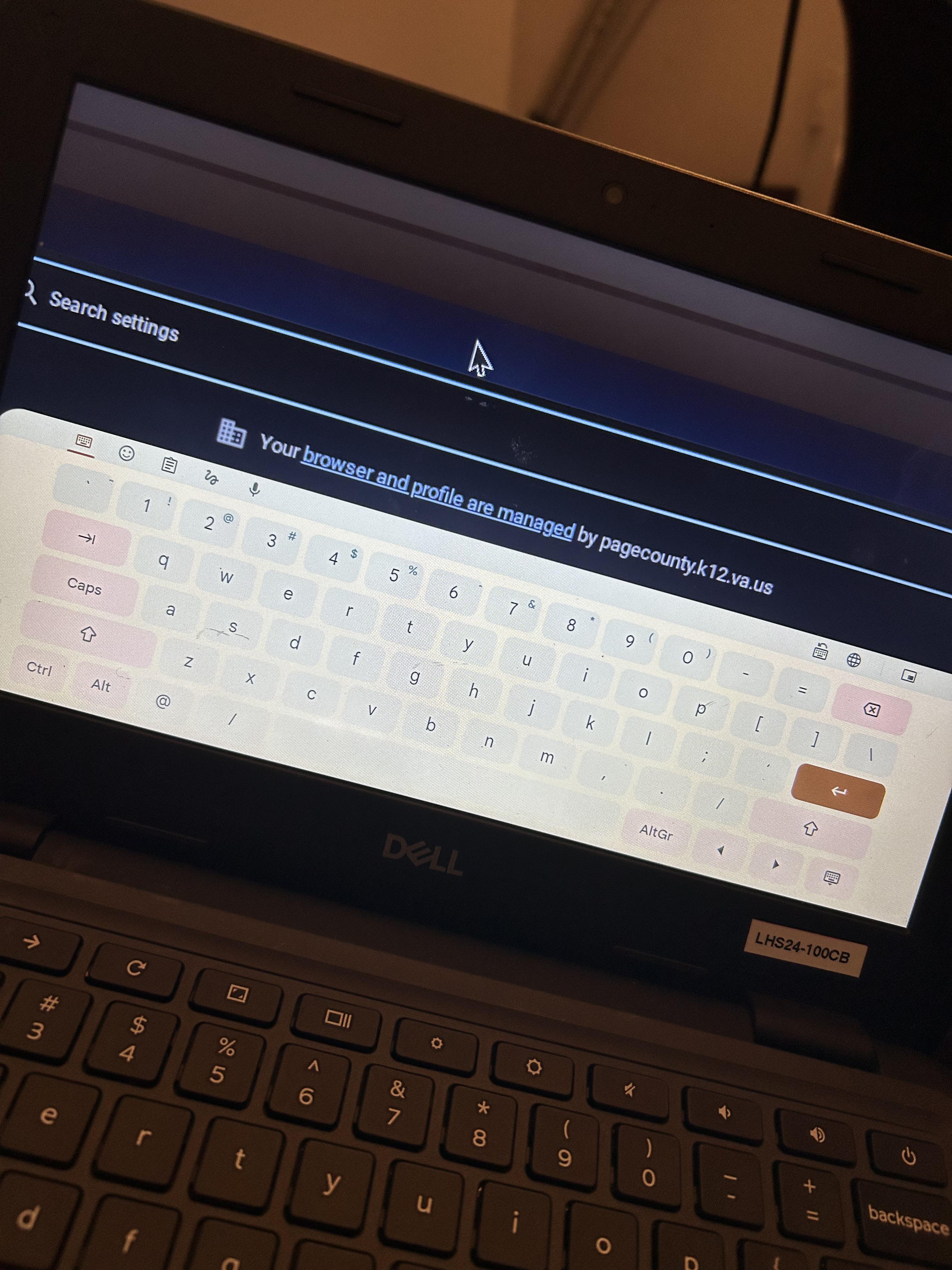
Troubleshooting Someone messed with my Chromebook and now everything is zoomed in, my mouse is huge, and a keyboard pulls up on the screen when I try to type

Post image
3 Upvotes

I just want it to go back to normal


r/chromeos • • 2d ago

Troubleshooting Play store keeps saying it's not connected to the internet/not finding results ?

3 Upvotes

I own a pretty old chromebook. Very recently I've had to completely powerwash it, and have lost all my local files, apps, etc. Now when I go to open the play store to re-install my apps though, it shows me the same "no results" or "no internet connection" screen, even when I'm connected just fine. I've had this problem before, but it usually fixed itself when I restarted the app or just left it alone for a few minutes. I've tried literally every solution I could find. I've switched wi-fi connections, cleared the storage, disabled and re-enabled the play store, and restarted my device, all countless times - nothing works. Someone said that removing your VPN extension fixes it, but that didn't help either. It's a personal chromebook, so it's not an issue with perms from a manager or administrator or anything. My device works fine besides this, but I kinda desperately need to re-install my apps because I use this thing to draw and write on, and often.

At first it didn't even show me any apps. Now it shows the apps but refuses to download them or continues to tell me it's not connected to the wifi. Please help !


r/chromeos • • 3d ago

Troubleshooting Chromebook Google docs and slides completely glitches out

Enable HLS to view with audio, or disable this notification

0 Upvotes

Displays doubled icon in the doc, randomly will go dark gray, did a regular shut down, then hard reset, refreshed, it’s never had this issue before, genuinely so lost. It’s at 30% (pretty normal) and it LITERALLY has never done this before. Every other tab is normal. I have an essay to write and no possible way to access this 😭😭 Please help!


r/chromeos • • 3d ago

Troubleshooting disappeared bookmarks

3 Upvotes

half my saved folders have been removed or gone or ??? .sometime over the last couple of days. boat connection folders, auto, weed, music, political, health,,, like WTF is the purpose of saving this shit if chrome is just gonna move em when they FUCKIN feel like it!!


r/chromeos • • 4d ago

Troubleshooting Fingerprint reader not working after updating to Version 156.0.8078.11 (Official Build) beta (64-bit)

5 Upvotes

I have a Lenovo Chromebook plus and after updating the software to Version 156.0.8078.11 (Official Build) beta (64-bit) my fingerprint reader no longer works. Ive tried a hardware reset and I have tried adding another fingerprint but nothing. Is anyone else experiencing this also before I powerflush?


r/chromeos • • 4d ago

Discussion Where was this taken?

Post image
32 Upvotes

r/chromeos • • 4d ago

Buying Advice Need recommendations for a budget friendly chromebook for elderly parent

6 Upvotes

Hello!

My mothers birthday is coming up in a month a bit and I'd like to surprise her with a new chromebook, got a budget of 350 euro for it.

She's not the most tech savvy person but enough to use a laptop / smartphone, and I heard chromebooks are great with its ease of use.

It doesn't need to be super specced out, she just watches/listens to shows on Youtube and occasionally browses the web, the only requirement would be 8gb of ram from the info i found, a decent size screen would be nice but not a must.

Thanks in advance for the recommendations!


r/chromeos • • 4d ago

Troubleshooting ASUS Chromebook CM14 - Xbox Controller via Bluetooth not working in GeForce NOW (works fine via USB)

2 Upvotes

​

Hey everyone,

I'm running into a frustrating issue with my ASUS Chromebook CM14 and was wondering if anyone else has experienced this or found a workaround.

Here is what's happening:

* When I pair and connect my Xbox wireless controller to my Chromebook via Bluetooth, ChromeOS recognizes it without any issues.

* However, when I open the GeForce NOW app, the app completely ignores the Bluetooth connection and won't register inputs from the controller.

* Interestingly, the moment I plug the controller in using a USB cable, GeForce NOW detects it immediately and everything works perfectly.

Has anyone else run into this specific Bluetooth limitation with the ASUS Chromebook CM14 or GeForce NOW? If so, did you manage to fix it so it works wirelessly?

Any tips or troubleshooting steps would be greatly appreciated!