r/Fedora • • 1d ago

Weekly project showcase thread

4 Upvotes

Did you create a Fedora-related project, tool, script, app, or service?

Share it here!

Standalone "I was tired of X so I made Y" posts may be redirected here to keep the subreddit focused.


r/Fedora • • 2h ago

Support new to fedora, ig i fumbled a few settings, lately been seeing these sharp edges around the corners

Post image
4 Upvotes

checked:

- blur my shell extension, even restarted my pc, it wasn't the cause of the problem

- custom shell theme, not the issue

- accessibility settings, nope

where shall i look next

edit: solved


r/Fedora • • 6h ago

Discussion How compatible is Fedora with the Cinnamon desktop environment?

7 Upvotes

To my understanding Fedora is made with KDA Plasma and Workshop/GNOME in mind. But I kinda miss the look and feel of my Mint system so I've been considering trying to layer Cinnamon on top of Fedora.

Does anyone know if there are any major bugs or incompatibilities with the two?


r/Fedora • • 7h ago

Discussion Qual ambiente de desktop você usa?

7 Upvotes
  • 1. GNOME
  • 2. KDE

r/Fedora • • 26m ago

Support Windows Refugee, loving Fedora but just learened about NTFS concerns

• Upvotes

Hey all, TIL that ntfs support is finicky, especially we must rely on chkdsk something in windows.

I'm not dual booting, I have 12400f with RX 9070. 1 TB SSD for OS, 2 TB HDD for media, images and storage. Typically NTFS reading and writing in linux is safe it seems, but it can corrupt when there are power outages during write (outages are frequent where I live).

Initially I brushed it off but I did have a failure where I reinstalled Win 11 to fix this.

Fix is simply to move to native linux filesystem like ext4 but it means I can no longer view this data in any windows machines / TV etc (if I must). Looks like btrfs is not good for hdd it seems.

To take backup and reformat I must rely on external hdd which again is NTFS formatted

So I'm trying to know if this issue can be fixed?


r/Fedora • • 13h ago

Discussion Can I Download Appropriate drivers for my GT 710 in Fedora 44?

5 Upvotes

My pc is does not have a good gpu. It is an Gt 710. As fedora removed support for its drivers for x11 Gpu. The open source drivers are slow. Is there any possible way of download 470xx drivers in Fedora 44? For Gt 710?


r/Fedora • • 1d ago

Discussion Big Moment: Deleted my Windows Backup!

58 Upvotes

Months and months ago, installed Fedora 44 for a lasting attempt to finally leave the spyware Windows. Made a full backup of my Windows machine just in case, but happy to report that, just yesterday, I deleted that backup because Fedora has been so good! Not perfectly perfect, but so smooth, and I have no intention of going back.

TY TY Fedora team! Happy to contribute how I can. Keep up the good work! 👏🏼


r/Fedora • • 22h ago

Support hey its me again :3

Post image
8 Upvotes

im using nvidia drivers


r/Fedora • • 20h ago

Support Fedora 44 KDE with NVIDIA GPU

6 Upvotes

I am new to linux and i just recently built a pc with all new parts and a fresh install of Fedora KDE 44 Plasma. I got a ryzen 5 9600x and a nvidia rtx 5060.
i have installed all the drivers for nvidia.
One monitor goes to displayport and the other goes to hdmi both configured at 60hz already.

Problem is whenever i turn on the pc, the displayport monitor goes to fedora and boots it, but after booting the screen is just blank and the hdmi input is not working at all.

What i did as a work around is transfer the hdmi cable to motherboard which have an internal amd gpu and the monitor comes to life including the one connected to the GPU. I then input my pw (it has secureboot enabled) and then goes to the login screen and both screen flickers a bit and then its ok after keyboard is pressed.
I then move back the hdmi from motherboard to gpu and both monitors work with no problems, problem happens every turning on.

Is this a fedora problem? I cant go back to 43 as this is a fresh install and i cant find an installer for 43 as well.

Edit: signing key is also enrolled into bios, not sure if that helps.


r/Fedora • • 20h ago

Support [Solved] High latency on AAC headphones

6 Upvotes

Hi, I have struggled for more than a week with high latency (200-300 ms) on my AAC Bluetooth headphones. After many unsuccessful attempts, I found out that apparently pipewire builds a huge audio buffer by default creating an artificially high latency, possibly to account for weak signal.

I solved it by running these commands:

mkdir -p ~/.config/wireplumber/wireplumber.conf.d/

cat << 'EOF' > ~/.config/wireplumber/wireplumber.conf.d/54-bluez-aac-latency.conf

monitor.bluez.rules = [

{

matches = [

{

node.name = "~bluez_output.*"

}

]

actions = {

update-props = {

bluez5.a2dp.aac.bitratemode = 0

node.latency = 512/48000

}

}

}

]

EOF

systemctl --user restart wireplumber

Hope this is useful for users in the future. Maybe Fedora should think about implementing this as a GUI option.


r/Fedora • • 8h ago

Support How do Install Linux?

0 Upvotes

So, I’ve actually been using Fedora KDE for about a year now on my old desktop, but I’m about to get my first laptop and, to be honest, I can’t remember the initial steps for setting up a dual-boot installation of Fedora KDE alongside Windows 11.
It’s a ThinkPad E16 Gen 3 with an Ultra 7 256V (incidentally, I’m still undecided as to whether 16 GB of non-upgradable RAM might be too little in the future – I could always send it back).

Could you remind me of the steps and the key points? Any advice or tips?
I already have a USB stick with Ventoy on it, onto which I’ll install a recent ISO.

If I’m not mistaken (I can’t recall this ever being mentioned in the online guides), you first need to disable BitLocker on Windows, then enter the BIOS and disable Fast Boot or something similar, and then you should be able to boot from the USB stick???

Anyway, one last thing: what do you reckon – when it arrives, should I use it with Windows for a few days to see how it goes, and then install Fedora? Any advice on how to check it properly as soon as it arrives?

Thank you, everyone

Note (before anyone says it looks like ai): This post is write by me but most of it has been translated using DeepL.


r/Fedora • • 1d ago

Discussion I installed Aurora today and I don't feel like $hit is going to break. Anyone install Aurora?

13 Upvotes

r/Fedora • • 1d ago

Support "sudo dnf update --refresh" not working -- need help

Post image
31 Upvotes

After doing a sudo dnf update and rebooting, it will not reboot. computer stays on, but my tv monitor says there is nothing connected.

There are some error messages that flash past during the update, but I'm not sure how to read/resolve them. Total noob here, so please explain like I'm 5).

The first two entries above (7.2.8 and 7.2.5) will not boot, but the third one (7.1.13) will work.

How do I fix this?


r/Fedora • • 1d ago

Support steam not working at all

5 Upvotes

I can't seem to make steam launch, have tried basic tips but nothing works.

palo@fedora:~$ steam
steam.sh[6244]: Running Steam on fedora 44 64-bit
steam.sh[6244]: STEAM_RUNTIME is enabled automatically
setup.sh[6295]: Steam runtime environment up-to-date!
steam.sh[6244]: Log already open
steam.sh[6244]: Steam client's requirements are satisfied
CProcessEnvironmentManager is ready, 6 preallocated environment variables.
[2026-10-12 02:22:10] Startup - updater built Jun 24 2026 23:24:37
[2026-10-12 02:22:10] Startup - Steam Client launched with: '/home/palo/.local/share/Steam/ubuntu12_32/steam' '-srt-logger-opened'
10/12 02:22:10 minidumps folder is set to /tmp/dumps
10/12 02:22:10 Init: Installing breakpad exception handler for appid(steam)/version(0)/tid(6347)
src/common/opensslconnection.cpp (1668) : unable to load trusted SSL root certificates
10/12 02:22:10 Init: Installing breakpad exception handler for appid(steam)/version(1.0)/tid(6347)
CProcessEnvironmentManager is ready, 6 preallocated environment variables.
[2026-10-12 02:22:10] Process started with command-line: '/home/palo/.local/share/Steam/ubuntu12_32/steam' '-child-update-ui' '-child-update-ui-socket' '8' '-srt-logger-opened'
10/12 02:22:10 minidumps folder is set to /tmp/dumps
[2026-10-12 02:22:10] Using update UI: console
10/12 02:22:10 Init: Installing breakpad exception handler for appid(steam)/version(0)/tid(6348)
[2026-10-12 02:22:10] Create window
assert_20261012022210_4.dmp[6352]: Uploading dump (out-of-process)
/tmp/dumps/assert_20261012022210_4.dmp
[2026-10-12 02:22:10] Loading cached metrics from disk (/home/palo/.local/share/Steam/package/steam_client_metrics.bin)
[2026-10-12 02:22:10] Failed to load cached hosts file (File 'update_hosts_cached.vdf' not found), using defaults
[2026-10-12 02:22:10] Using the following download hosts for Public, Realm steamglobal
[2026-10-12 02:22:10] 1. https://client-update.steamstatic.com, /, Realm 'steamglobal', weight was 1, source = 'baked in'
ILocalize::AddFile() failed to load file "public/steambootstrapper_english.txt".
[2026-10-12 02:22:10] Verifying installation...
[2026-10-12 02:22:10] Verifying file sizes only
[2026-10-12 02:22:10] Unable to read and verify install manifest /home/palo/.local/share/Steam/package/steam_client_ubuntu12.installed
[2026-10-12 02:22:10] Verification complete
[2026-10-12 02:22:10] Downloading Update...
[2026-10-12 02:22:10] Checking for available update...
[2026-10-12 02:22:10] Downloading manifest: https://client-update.steamstatic.com/steam_client_ubuntu12
[2026-10-12 02:22:10] Manifest download: send request
[2026-10-12 02:22:10] Set percent complete: 0
[2026-10-12 02:22:10] Set percent complete: -1
[2026-10-12 02:22:10] Set status message: Verifying installation...
[----] Verifying installation...
[2026-10-12 02:22:10] Set percent complete: 0
[2026-10-12 02:22:10] Set status message: Downloading Update...
[  0%] Downloading Update...
[2026-10-12 02:22:10] Set status message: Checking for available update...
[  0%] Checking for available update...
[2026-10-12 02:22:10] Set percent complete: -1
[2026-10-12 02:22:10] Manifest download: waiting for download to finish
[2026-10-12 02:22:10] Manifest download: finished
[2026-10-12 02:22:10] Download failed: http error 0 (client-update.steamstatic.com/steam_client_ubuntu12)
[2026-10-12 02:22:10] DownloadManifest - exhausted list of download hosts
[2026-10-12 02:22:10] failed to load manifest from buffer.
[2026-10-12 02:22:10] Failed to load manifest
[2026-10-12 02:22:10] Error: Download failed: http error 0
[2026-10-12 02:22:10] Saving metrics to disk (/home/palo/.local/share/Steam/package/steam_client_metrics.bin)
[2026-10-12 02:22:10] Error: Steam needs to be online to update. Please confirm your network connection and try again.
UpdateUI: skip show logo
[2026-10-12 02:22:10] Shutdown
[2026-10-12 02:22:10] Fatal error: Steam needs to be online to update. Please confirm your network connection and try again.
[----] !!! Fatal Error: Steam needs to be online to update. Please confirm your network connection and try again.
[2026-10-12 02:22:10] Destroy window
[2026-10-12 02:22:10] Shutdown
assert_20261012022210_4.dmp[6352]: Finished uploading minidump (out-of-process): success = yes
assert_20261012022210_4.dmp[6352]: response: CrashID=bp-76c06fb9-2129-4d7b-ba62-d4d042261011
assert_20261012022210_4.dmp[6352]: file ''/tmp/dumps/assert_20261012022210_4.dmp'', upload yes: ''CrashID=bp-76c06fb9-2129-4d7b-ba62-d4d042261011''
src/tier0/threadtools.cpp (3792) : Assertion Failed: Illegal termination of worker thread 'Thread(0x0x57ebf0a0/0x0xf769cb'
10/12 02:22:11 Init: Installing breakpad exception handler for appid(steam)/version(1.0)/tid(6347)
assert_20261012022211_11.dmp[6360]: Uploading dump (out-of-process)
/tmp/dumps/assert_20261012022211_11.dmp
palo@fedora:~$ assert_20261012022211_11.dmp[6360]: Finished uploading minidump (out-of-process): success = yes
assert_20261012022211_11.dmp[6360]: response: CrashID=bp-d89d22d8-6809-434e-86b1-e9c1f2261011
assert_20261012022211_11.dmp[6360]: file ''/tmp/dumps/assert_20261012022211_11.dmp'', upload yes: ''CrashID=bp-d89d22d8-6809-434e-86b1-e9c1f2261011''

r/Fedora • • 1d ago

Support Left Windows for Linux... Now NTFS is causing me problems (Fedora 44. Any help troubleshooting speeds or swapping to ext4 would be appreciated!!)

Thumbnail
0 Upvotes

r/Fedora • • 2d ago

Screenshot Almost at 7 years with Fedora.

Post image
213 Upvotes

And 6 with atomic editions. Old laptop still going like it's brand new.


r/Fedora • • 1d ago

Support How do I get Arabic qwerty English layout

Post image
6 Upvotes

I can't seem to figure out how to get the layout working on my keyboard and it's kinda important I figure it out quickly since I need it for work.


r/Fedora • • 2d ago

Screenshot 3 months in and i love it in here

Thumbnail
gallery
143 Upvotes

Everything just feels so easy and looks so good, if it weren't for FL Studio I'd stay only on Linux.

As a little anecdote, my dad brought to me like 2 months ago a 20 years old printer he found randomly and no matter how many drivers and solutions I tried, it simply didn't work on his Windows. I nearly called it quits and accepted the defeat on his behalf, but before going to sleep I wanted to try it on my laptop with Fedora.

Of course it didn't work first try, but after I ran a simple command I found online, it worked like a charm. I couldn't believe my eyes how easy that was, like plug and play, so now my dad has a virtual machine on his Windows with Fedora xD

Feel free to ask any questions!


r/Fedora • • 1d ago

Screenshot Simple Black Gnome

11 Upvotes

r/Fedora • • 1d ago

Support Slowdowns after wake up from sleep: disable plocate ?

Thumbnail
0 Upvotes

r/Fedora • • 1d ago

Support Missing 240Hz on HDMI 2.1

3 Upvotes

Hi everyone,

I would like to ask if anyone has experienced a similar issue with their monitor reporting incorrect resolutions and refresh rates.

My monitor is an LG 27GR95QE-B, which supports 2560×1440 at 240Hz. When I was using CachyOS, it correctly reported and allowed 1440p @ 240Hz. However, after switching to Fedora, the highest refresh rate available at 1440p is only 144Hz.

What's even stranger is that Fedora also reports 2160p @ 120Hz, even though this monitor's native and maximum resolution is only 1440p. Because of this, the 1440p @ 240Hz option has completely disappeared.

The monitor is connected using an HDMI 2.1 cable and the GPU is an AMD Radeon 7900XT. Has anyone encountered this issue before? If so, what did you do to fix it?

Any help or suggestions would be greatly appreciated. Thanks in advance, and sorry for my English.

Edit. Included my system's GPU.


r/Fedora • • 2d ago

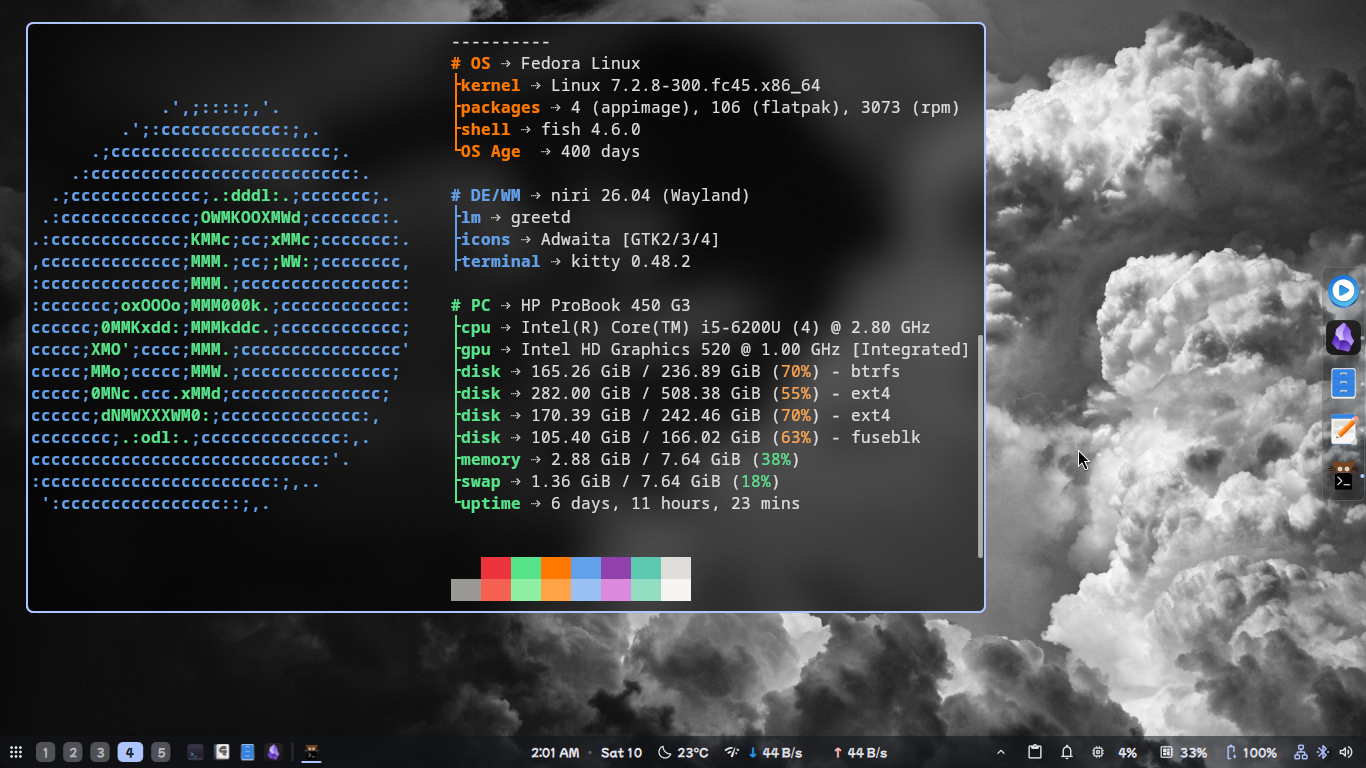
Screenshot 400 Days on fedora!

Post image
403 Upvotes

I have been on fedora for over a year now. Rock solid stability and smooth. Currently running niri with dms.

My laptop is quite old but runs surprisingly well.


r/Fedora • • 1d ago

Support Steam Issues with X11

3 Upvotes

I have no clue what's causing this to happen, Steam was fine yesterday and now it has this error, some other apps might not work but to my knowledge one of them is the Dolphin Emulator (not the file explorer I mean the Gamecube/Wii Emulator) I'll share the steam.sh output below

steam.sh[6483]: Running Steam on fedora 44 64-bit
steam.sh[6483]: STEAM_RUNTIME is enabled automatically
setup.sh[6519]: Steam runtime environment up-to-date!
steam.sh[6483]: Steam client's requirements are satisfied
CProcessEnvironmentManager is ready, 5 preallocated environment variables.
[2026-10-11 09:46:08] Startup - updater built Sep  3 2026 01:31:48
[2026-10-11 09:46:08] Startup - Steam Client launched with: '/home/Dominick/.local/share/Steam/ubuntu12_32/steam' '-s
rt-logger-opened'
10/11 09:46:08 minidumps folder is set to /tmp/dumps
10/11 09:46:08 Init: Installing breakpad exception handler for appid(steam)/version(1788652215)/tid(6577)
Looks like steam didn't shutdown cleanly, scheduling immediate update check
CProcessEnvironmentManager is ready, 5 preallocated environment variables.
[2026-10-11 09:46:08] Process started with command-line: '/home/Dominick/.local/share/Steam/ubuntu12_32/steam' '-chil
d-update-ui' '-child-update-ui-socket' '8' '-srt-logger-opened'
10/11 09:46:08 minidumps folder is set to /tmp/dumps
[2026-10-11 09:46:08] Using update UI: console
10/11 09:46:08 Init: Installing breakpad exception handler for appid(steam)/version(0)/tid(6578)
[2026-10-11 09:46:08] Create window
[2026-10-11 09:46:08] Loading cached metrics from disk (/home/Dominick/.local/share/Steam/package/steam_client_metric
s.bin)
[2026-10-11 09:46:08] Using the following download hosts for Public, Realm steamglobal
[2026-10-11 09:46:08] 1. https://client-update.fastly.steamstatic.com, /, Realm 'steamglobal', weight was 900, source
= 'update_hosts_cached.vdf'
[2026-10-11 09:46:08] 2. https://client-update.akamai.steamstatic.com, /, Realm 'steamglobal', weight was 400, source
= 'update_hosts_cached.vdf'
[2026-10-11 09:46:08] 3. https://client-update.steamstatic.com, /, Realm 'steamglobal', weight was 1, source = 'baked
in'
[2026-10-11 09:46:08] Checking for update on startup
[2026-10-11 09:46:08] Checking for available updates...
[2026-10-11 09:46:08] Downloading manifest: https://client-update.fastly.steamstatic.com/steam_client_ubuntu12
[2026-10-11 09:46:08] Manifest download: send request
[2026-10-11 09:46:08] Set percent complete: 0
[2026-10-11 09:46:08] Set status message: Checking for available updates...
[  0%] Checking for available updates...
[2026-10-11 09:46:08] Set percent complete: -1
[2026-10-11 09:46:09] Manifest download: waiting for download to finish
[2026-10-11 09:46:09] Manifest download: finished
[2026-10-11 09:46:09] Download skipped: /steam_client_ubuntu12 version 1788652215, installed version 1788652215, exis
ting pending version 0
[2026-10-11 09:46:09] Nothing to do
[2026-10-11 09:46:09] Verifying installation...
[2026-10-11 09:46:09] Verifying all executable checksums
[2026-10-11 09:46:09] Set percent complete: -1
[2026-10-11 09:46:09] Set status message: Verifying installation...
[----] Verifying installation...
[2026-10-11 09:46:10] Verification complete
UpdateUI: skip show logo
[2026-10-11 09:46:10] Destroy window
[2026-10-11 09:46:10] ProcessNextMessage: socket disconnected
[2026-10-11 09:46:10] No more messages are expected - exiting

Steam logging initialized: directory: /home/Dominick/.local/share/Steam/logs

Unable to open X11 display, exiting

Edit: I tried the flatpak version and got this as well
The unofficial Steam Flatpak app requires a correctly-configured desktop

session, which must provide the DISPLAY environment variable to the

D-Bus session bus activation environment.

On systems that use systemd --user, the DISPLAY environment variable must

also be present in the systemd --user activation environment.

This is usually achieved by running:

dbus-update-activation-environment DISPLAY

during desktop environment startup.


r/Fedora • • 1d ago

Support i recently installed my drivers for my gpu (3050) and now my laptop is like really hot all the time for some reason

5 Upvotes

it wasnt like that before how can i fix it?


r/Fedora • • 1d ago

Support Want to install Fedora on Lenovo but EFI partition is locked

3 Upvotes

I'm in the live USB. I can resize the Windows partition to make room for a Fedora install, but the EFI partition is locked. The action icon is greyed out for some reason. If I try to proceed with the installation, a warning message comes up saying the 500MB EFI partition is too small.

Is there any way to unlock the EFI partition?

I have a Lenovo Thinkpad Yoga L13 Gen 2.

Update:

There's a guide to extending the EFI partition here using AOEMI Partition Assistant. Is this trustworthy? I don't feel like reinstalling Windows...